
🧠 AI Engines: The Shopify llms.txt Audit
- The file already exists. Since May 2026, Shopify auto-generates /llms.txt, /llms-full.txt, and /agents.md on every eligible store. The question is no longer how to create it – it’s whether the default is working for you or against you.
- The default is bare-bones. Shopify’s auto-generated file leads with the Shop app and links to broad collection and search pages – not your hero products, policies, or FAQ.
- The old redirect method is dead. CDN uploads plus URL redirects (the 2024–2025 workaround) no longer serve the file. Shopify owns the route natively.
- The fix is a Liquid theme template. You override the default by editing the new llms.txt / agents.md templates in your theme – not with a heavy app that dumps your whole catalog.
- Action: Run the 10-point audit below to move your store from “silently indexed by Shopify’s defaults” to “deliberately optimized for AI citation.”
First, Why This Audit Matters More Than It Did Six Months Ago
For most of 2025, adding an llms.txt file to a Shopify store was a manual project – and a slightly awkward one, because Shopify wouldn’t let you drop a file at the root of your domain. Agencies (including us) documented redirect workarounds to get it live.
In May 2026, Shopify quietly switched on native, auto-generated AI-discovery files across the platform as part of its Universal Commerce Protocol (UCP) rollout – the infrastructure that lets ChatGPT, Perplexity, and Microsoft Copilot discover and transact with your store without scraping your HTML. Visit yourdomain.com/llms.txt right now. If your store is on the rollout, a generated file loads. Nobody on your team made it. Shopify did.
Here’s the catch that most merchants haven’t clocked yet: a file that Shopify generated to serve Shopify’s ecosystem is not the same as a file optimized to sell your products. The defaults are thin, and in some cases they surface Shopify’s own Shop app before your catalog.
This matters because the traffic is real. AI-referred traffic to Shopify grew roughly 8x year over year by Q1 2026, and AI-attributed orders grew about 13x in the same window, according to Shopify’s own figures. Separately, McKinsey found that more than half of consumers now use AI tools for product research. When an AI agent decides which store to cite for “best waterproof hiking boots under $150,” your llms.txt is one of the cross-reference signals it reads to decide whether you’re the answer – or whether your competitor is.
So the modern question isn’t “Do I have an llms.txt?” You almost certainly do. It’s “Is mine actually working?”
Run the ten checks below. Give yourself one point for each you pass.
New here? If you want the full background on what llms.txt is and how it differs from robots.txt, start with our foundational guide: Implementing LLMS.txt in Shopify – Best Practices for SEO and AI Indexing. This article assumes you already know the basics and want to diagnose your current setup.
The 10-Point Shopify llms.txt Audit
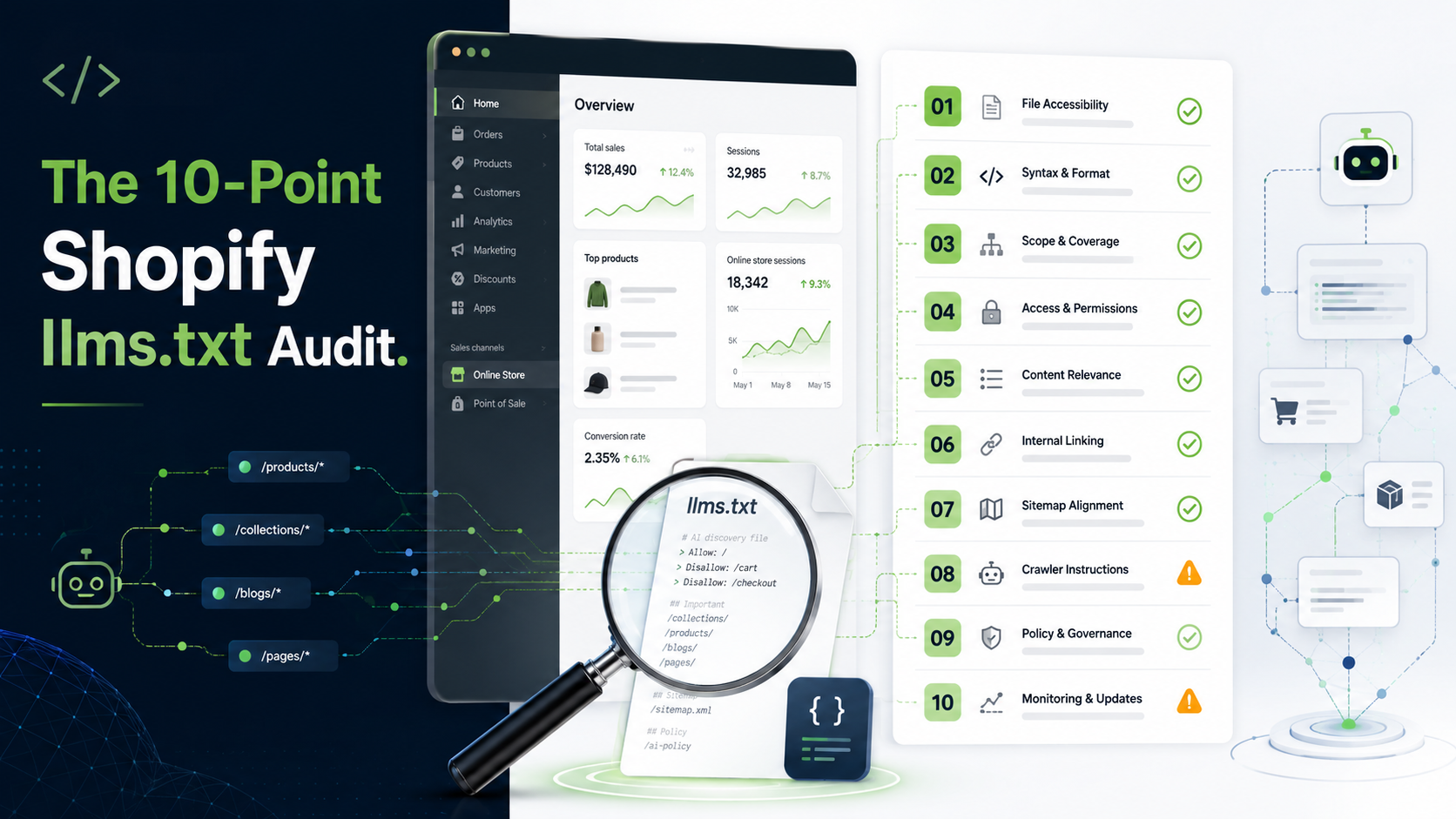
✅ 1. Does your file even load? (The 200-vs-404 test)
Open a browser and go to yourdomain.com/llms.txt, then yourdomain.com/agents.md.
The rollout happened store-by-store rather than all at once, so some smaller and headless stores were still returning a 404 weeks after larger stores went live. If yours 404s, you’re invisible to any agent that checks for the file – the equivalent of a shop with no sign on the door.
Pass: Both URLs return a live, readable file (a 200 response). Fix if you fail: Confirm your store’s rollout status, and if you’re on a headless/Hydrogen build, plan to serve these routes manually – the auto-generation doesn’t always reach custom storefronts.
✅ 2. Are you still running the dead redirect method?
If your store was set up before mid-2026, there’s a good chance someone created a URL redirect from /llms.txt to a file hosted on Shopify’s CDN. That method no longer works – the old redirect endpoints were retired around June 2026, and Shopify now serves the route natively.
Worse, a leftover redirect can conflict with Shopify’s native file, producing broken or duplicated output.
Pass: No legacy /llms.txt or /llms-full.txt redirects exist in Online Store → Navigation → URL Redirects. Fix if you fail: Delete the old redirects. Let Shopify serve the file, then customize it the modern way (see point 9).
✅ 3. Is agents.md present – and is it your canonical file?
This is the change most merchants missed entirely. As of late May 2026, /agents.md became Shopify’s canonical AI-discovery file, with /llms.txt and /llms-full.txt defaulting to mirror it. Agents increasingly look for agents.md first.
If you’ve optimized llms.txt but ignored agents.md, you may be polishing the file that now plays second fiddle.
Pass: You understand the fallback chain and your agents.md reflects your intended content. Fix if you fail: Treat agents.md as the primary surface. Shopify provides a separate Liquid template for it – customize that one first.
✅ 4. Does the default lead with Shopify instead of you?
Read your file top to bottom. The auto-generated default frequently opens with agent-discovery hooks tied to Shopify’s own infrastructure and, in some configurations, nudges toward the Shop app. An AI agent reads top-down and weights early content heavily – so if it meets Shopify’s pitch before your catalog, that’s the impression it forms of your store.
Pass: The first thing an agent reads is a clear description of your brand and what you sell. Fix if you fail: Override the template so your store’s identity and hero categories appear first.
✅ 5. Are your top product pages actually in there?
The single biggest weakness of the default file: it tends to link to your all-collections page, your search page, and your contact info – but not your best-selling product or category pages. That gives an agent a thin, generic picture of your store right before it decides whether you’re worth recommending.
Pass: Your 10–20 hero products and key collections are explicitly linked. Fix if you fail: Add curated links to your highest-intent, highest-margin pages. This is where an agent forms its shortlist.
✅ 6. Are your policy, shipping, size, and FAQ pages included?
When a shopper asks an AI “Does this brand ship to Australia?” or “What’s their return window?”, the agent looks for an authoritative first-party source. If your shipping, returns, size-guide, and FAQ pages are named in your file, the AI answers accurately from your data. If they’re not, it may guess – or pull from an outdated third-party page – and a wrong answer at that moment is a lost sale.
Pass: Shipping, returns, warranty, size guide, and FAQ pages are all linked. Fix if you fail: Add them. These “boring” pages are among the most-cited by shopping agents.
✅ 7. Is your file curated – or is it a 5,000-line catalog dump?
More is not better here. A bloated file that lists every product, collection, and blog post forces an agent to wade through clutter to find what matters – and a 5,000-line llms.txt genuinely performs worse than a tight 60-line one. Many auto-generation apps make exactly this mistake.
The correct pattern: a curated llms.txt for the highlights, and a separate llms-full.txt for the deep dump when an agent wants full context.
Pass: Your llms.txt is a focused table of contents; the exhaustive content lives in llms-full.txt. Fix if you fail: Trim the summary file to your best pages and let the “full” file carry the volume.
✅ 8. Is the content accurate and current?
An AI-discovery file is only as good as its freshness. Discontinued products, last season’s prices, or a superseded returns policy don’t just look sloppy – they actively feed hallucinations, because the agent treats your file as a source of truth. A confidently wrong AI answer about your own store is worse than no answer.
Pass: Everything referenced is live, in stock, and current as of your last major change. Fix if you fail: Establish a refresh cadence – after every seasonal launch, price change, or policy update.
✅ 9. Did you customize via Liquid template – not a bloated app?
Shopify shipped dedicated Liquid theme templates for agents.md, llms.txt, and llms-full.txt on May 28, 2026. This is now the correct, lightweight way to control your content: Online Store → Themes → Edit code → add the relevant template.
Reaching for a heavy third-party app that re-dumps your entire catalog on every change is usually a step backward – it reintroduces the clutter problem from point 7 and can slow your store.
Pass: Your content is controlled through the native Liquid templates. Fix if you fail: Move customization into the theme templates. If you use an app, pick one that lets you curate sections rather than dump everything.
✅ 10. Can you prove an AI is actually reading it?
Setup without verification is guesswork. There are two quick ways to check:
- Ask the AI directly. Prompt ChatGPT or Perplexity: “Based on the llms.txt file at [yourdomain.com], what’s their return policy?” A precise answer that matches your file means it’s being read.
- Check your logs. Look for known AI crawlers (GPTBot, ClaudeBot, PerplexityBot) hitting the file, and make sure your robots.txt and any WAF rules allow them. Blocking the crawler that reads your discovery file is a surprisingly common self-inflicted wound.
Pass: You’ve confirmed at least one AI engine returns file-accurate answers. Fix if you fail: Allowlist the major AI crawlers, then re-test after a crawl cycle.
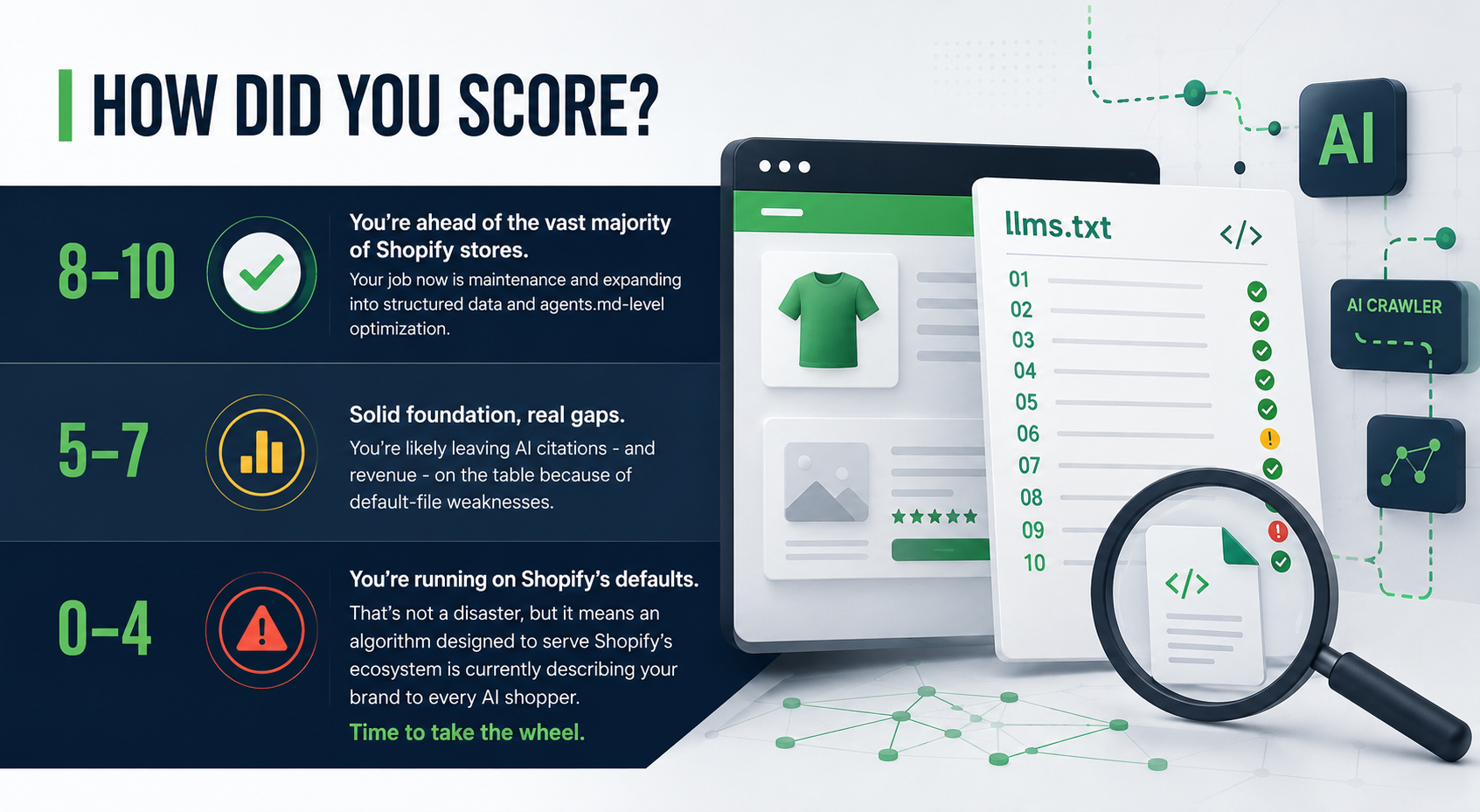
How Did You Score?
- 8–10: You’re ahead of the vast majority of Shopify stores. Your job now is maintenance and expanding into structured data and agents.md-level optimization.
- 5–7: Solid foundation, real gaps. You’re likely leaving AI citations – and revenue – on the table because of default-file weaknesses.
- 0–4: You’re running on Shopify’s defaults. That’s not a disaster, but it means an algorithm designed to serve Shopify’s ecosystem is currently describing your brand to every AI shopper. Time to take the wheel.
One More Thing for EU Stores: The August 2026 Deadline
If you sell into the EU, note that new EU AI Act transparency rules take effect in August 2026 and apply to merchants using AI recommendations, chatbots, or dynamic pricing – not only to big tech. Your AI-discovery setup and your on-site AI features should be reviewed together for compliance, not in isolation. It’s one more reason the “set it and forget it” approach to AI files is riskier than it looks.
Why This Is Harder to Maintain Than It Looks
Here’s the uncomfortable truth about AI visibility in 2026: it’s a moving target, not a one-time task. In the first half of 2026 alone, Shopify changed the canonical file (from llms.txt to agents.md), retired the old redirect method, and shipped new Liquid templates – all largely without fanfare. Several major AI crawlers also adjusted how they weight Markdown headers.
A solo founder sets this up once and moves on. By the next quarter, the platform has shifted underneath them and the file is quietly out of date. This is exactly where a senior fractional team – developers, CRO, and SEO working from one plan – turns a maintenance headache into a durable competitive edge.
Turn Your Audit Into an Advantage – With eCommerce Today
Running the audit is the easy part. Fixing the gaps – curating the right pages, customizing your Liquid templates, aligning agents.md, structuring product data agents can actually parse, and keeping it all current as Shopify evolves – is ongoing work.
That’s the core of our A.I. e-commerce optimization for Shopify stores. We go well beyond editing a text file: we audit your semantic structure, optimize your technical SEO and product feeds, and actively manage your AI-facing assets so models like ChatGPT, Gemini, and Perplexity recommend your products instead of guessing from stale web scrapes.
Don’t leave your brand’s AI presence on autopilot. Talk to a Shopify AI-visibility specialist and let’s get your store from “search-visible” to “generatively ready.”
Frequently Asked Questions
1. Do I still need to create an llms.txt file for Shopify in 2026?
No – Shopify auto-generates /llms.txt, /llms-full.txt, and /agents.md on eligible stores as of May 2026. Your task is now to customize the defaults, not build the file from scratch.
2. Why did my old llms.txt redirect stop working?
Shopify now serves these routes natively and retired the old CDN-redirect approach around June 2026. A leftover redirect can conflict with the native file, so it should be removed.
3. What's the difference between agents.md and llms.txt now?
As of late May 2026, agents.md is Shopify’s canonical AI-discovery file, and llms.txt / llms-full.txt default to mirroring it. Optimize agents.md first, but keep all three consistent.
4. Will optimizing my llms.txt help me rank higher on Google?
Not directly. But because AI-generated answers (including Google’s AI Overviews) increasingly pull from AI-readable sources, a clean, accurate file makes your store more likely to be the cited source.
5. How do I edit these files on Shopify?
Go to Online Store → Themes → Edit code and use the dedicated Liquid templates for agents.md, llms.txt, and llms-full.txt that Shopify shipped on May 28, 2026.
6. How do I confirm an AI is actually using my file?
Ask ChatGPT or Perplexity a question only answerable from your file (like your return window), and check your server logs for AI crawlers such as GPTBot, ClaudeBot, and PerplexityBot.