
Modifying an online store’s theme right before a major campaign has historically been a high-wire act performed without a safety net. Think about Black Friday, Cyber Monday (BFCM), or massive seasonal product drops, these are the critical moments when traffic hits its absolute peak. In these high-stakes environments, even a minor design flaw, a broken mobile layout, or a confusing checkout flow can cost thousands, if not tens of thousands, of dollars in lost sales.
In the past, executing a theme change meant pushing a new design live, crossing your fingers that everything rendered correctly across all devices, and keeping a nervous finger hovering over the “Publish” button of the old backup theme just in case the conversion rate decided to plummet. Historically, rigorous A/B testing of themes required clunky, expensive third-party applications. These apps often bloated the store’s code, caused dreaded “flicker” effects during page loads (harming your Largest Contentful Paint metrics), and came with hefty monthly subscription fees.
But the rules of e-commerce optimization have officially changed. Shopify has introduced the native Rollouts feature (housed within the Markets dashboard), fundamentally transforming how merchants and development agencies approach design testing and implementation.
This comprehensive guide explores how you can leverage this powerful feature to mitigate launch risks and, more importantly, how agencies and freelancers can package it into a highly profitable new revenue stream.
Understanding the Shopify Rollouts Engine
At its core, Shopify Rollouts is a native, built-in system that allows you to manage, schedule, and test theme modifications before they become permanent fixtures on your storefront. Because it is built directly into Shopify’s infrastructure, it runs server-side. This means there are no external scripts dragging down your site speed, no visual flickering when a user lands on the page, and zero additional costs for visual A/B testing software.
Rollouts allow you to test anything from minor visual tweaks in the theme editor, such as altering the homepage structure, modifying hero section messaging, or swapping promotional banners, to running a direct, side-by-side comparison between two entirely different theme architectures.
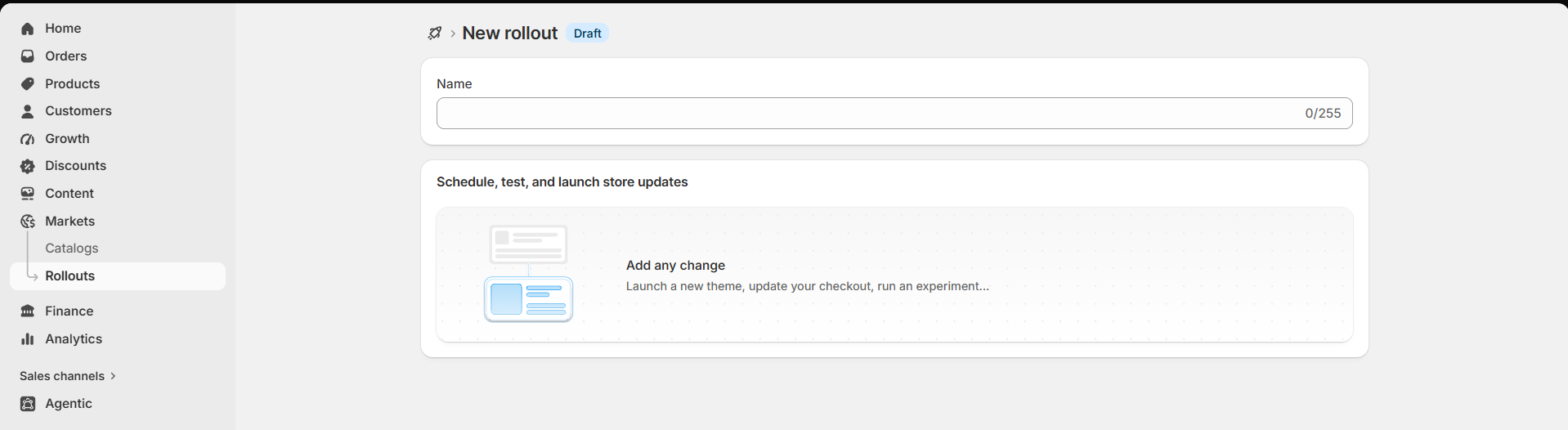
Mitigating Risk During High-Stakes Campaigns
When the stakes are high, testing safely becomes your number one priority. Let’s break down exactly how the specific capabilities within Markets -> Rollouts eliminate the anxiety of store updates.
1. Scheduling Theme Swaps with Automatic Reverts
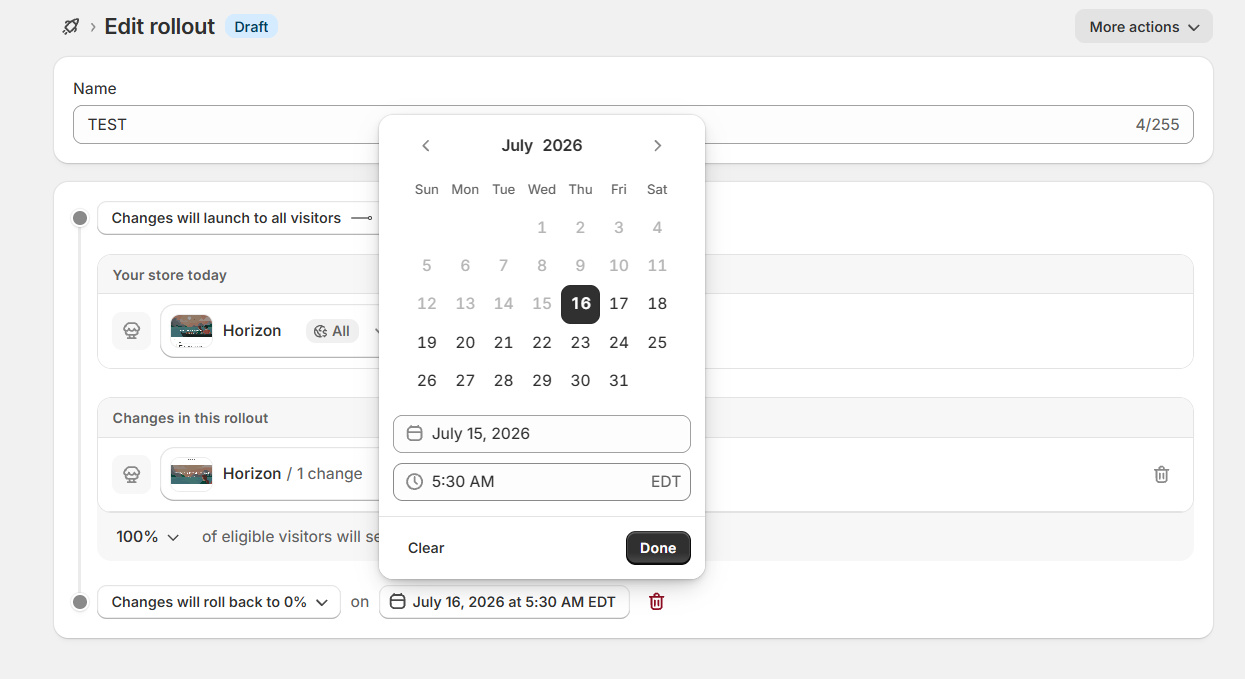
Traditionally, launching a midnight flash sale meant that someone on your technical or marketing team had to stay awake to manually hit “Publish” on the theme containing the new promotional banners. With native Rollouts, those days are over. You can now schedule the exact day, hour, and minute a new theme configuration will go live.
Even more crucial is the automatic revert functionality. This is an absolute lifesaver for time-sensitive campaigns. You can set a definitive end date and time for your rollout. When the promotion concludes (for example, a 48-hour Halloween flash sale), the store automatically reverts to its primary, evergreen theme. This completely eliminates the embarrassing and costly risk of displaying expired promotional banners because someone forgot to manually disable them on a Sunday morning.
2. Gradual Rollouts and Traffic Control
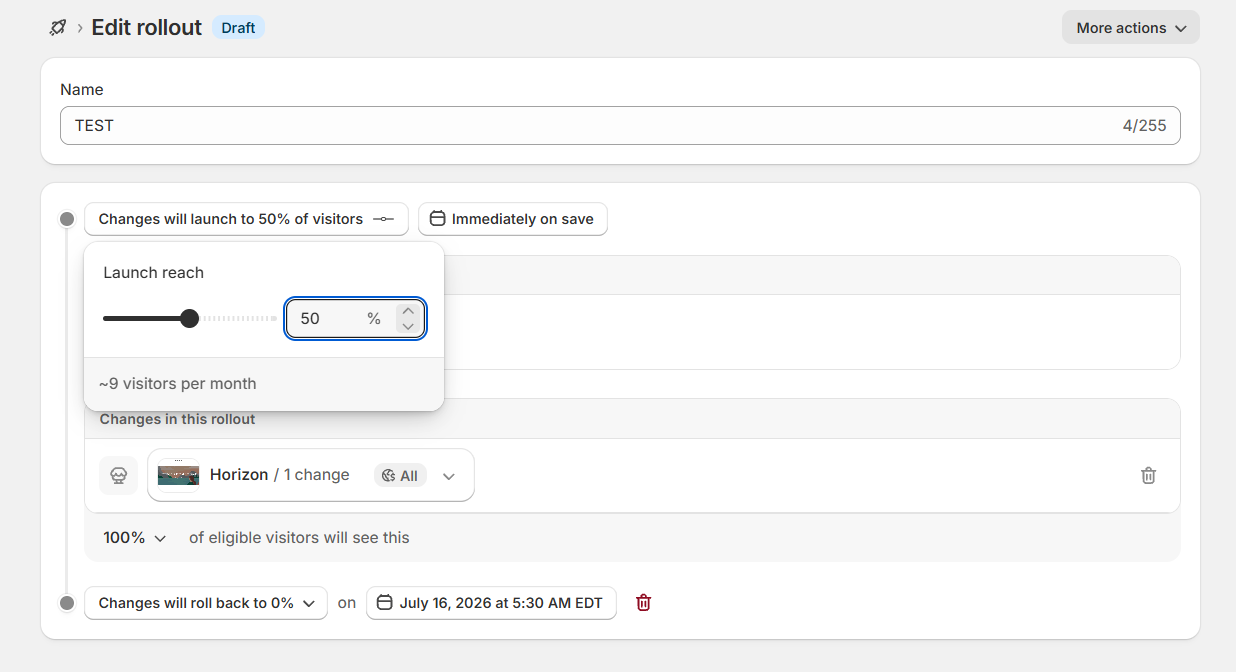
You no longer have to throw 100% of your hard-earned traffic at an untested new theme and hope for the best. Rollouts empower you to select a specific, custom percentage of your audience to experience the new variant.
- The Golden Rule of E-commerce Testing: Always start small. Allocate 10% of your traffic to the new variant first. Allow real users to interact with the new design to uncover potential UX bugs, broken mobile links, or visual contrast issues before you confidently ramp up exposure to 50% or 100%.
3. True A/B Testing Between Different Theme Configurations
This is where the Rollouts feature truly outshines legacy methods. It allows for genuine A/B testing between your live, default theme and an experimental configuration. Traffic is split cleanly at the server level, and Shopify automatically tracks the impact on your most critical business metrics:
- Conversion Rate (CRO)
- Average Order Value (AOV)
- Total Revenue Generated
You can finally answer complex design questions with hard data rather than gut feelings.
- “Does a looping background video in the hero section convert better than static lifestyle imagery?”
- “Will moving customer reviews above the product description on the Product Detail Page (PDP) increase add-to-cart actions?”
Now, you can test it natively and watch the data roll in.
4. Localizing Content Without Heavy Third-Party Apps
If you sell internationally, you already know how difficult and expensive it can be to provide unique, culturally relevant experiences per region. Because Rollouts integrates natively with Shopify Markets, you can direct a specific experiment exclusively to a specific geographic market.
Do you want to test a homepage layout tailored for the European market, featuring localized shipping messages, Euro-centric lifestyle imagery, and region-specific top-sellers, while maintaining your core experience for North American shoppers? Rollouts make this possible out of the box. It provides geographic flexibility that previously required complex custom coding or heavy, site-slowing localization applications.
Conclusion
The introduction of Shopify Rollouts marks a significant maturation of the platform’s native capabilities. E-commerce merchants no longer have to rely on intuition, invest thousands of dollars in external testing scripts, or hold their breath every time they alter their site’s structure right before Black Friday.
You can now schedule promotional events seamlessly, test radical new layouts with a fraction of your traffic, and make design decisions that are mathematically sound—all within the native Shopify ecosystem. For merchants, it acts as a safety net. For agencies, developers, and CRO experts, it is the perfect foundation for building highly profitable, performance-driven service offerings.
Ready to take the risk out of your next big launch? If you want to safely implement Shopify Rollouts on your store and start making data-driven design decisions, contact eCommerce-Today and let our experts handle the setup for you.