
In the online world, speed is the new currency! If you’re running a Shopify store, you’re already ahead of the game in the e-commerce world. No matter how stunning your products are, if your images take ages to load, you’re losing customers and, worse, revenue. That’s where the magic of image optimization comes into play.
TL;DR (For E-com Ops & Growth Leads) 🖼️ Is your imagery killing your conversion rate?
- Speed is the New Currency: A 1-second delay reduces conversions by 7%. Optimization isn't just about "looking good"—it’s a direct lever for reducing bounce rates and reclaiming lost revenue.
- The Format Trifecta: Use JPEG for photos, PNG for logos/transparency, and WebP for the ultimate balance of high quality and tiny file sizes.
- Strict Weight Limits: Keep hero banners under 1MB and product photos around 300KB. Use tools like TinyJPG or PicWish to compress assets without sacrificing visual integrity.
- Dimensions Matter: Avoid blurry or cropped content by adhering to Shopify's "Golden Zones"—2048x2048px for products and theme-specific widths (up to 2500px) for hero banners to ensure mobile responsiveness.
The Basics of Image Optimization
Understanding Image Formats: JPEG, PNG, and WebP
It’s important to understand the differences between JPEG, PNG, and WebP.
- JPEG is the most common format, known for its ability to compress images to smaller sizes while maintaining decent quality, making it ideal for photographs.
- PNG, on the other hand, is a lossless compression format that preserves image quality and supports transparency, making it perfect for logos and graphics.
- WebP is a relatively new format developed by Google, offering both lossy and lossless compression, and it often provides higher-quality images at smaller file sizes compared to JPEG and PNG.
Responsiveness is crucial
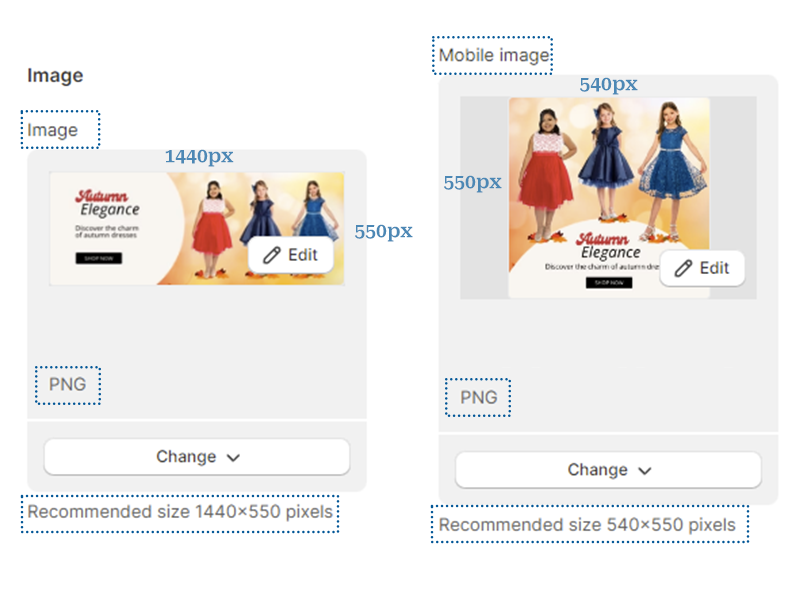
Image dimensions refer to the width and height of an image in pixels. It’s essential to resize your images to the dimensions that best suit your website’s design and layout. By optimizing your image dimensions, you can ensure that your images look great on all devices, from desktops to smartphones, without compromising on speed or quality. Shopify templates are specially built to accept images for desktop and mobile screens. This will allow the banner images, for example, to properly display the message and call to action button. The below image is a screenshot of Shopify theme settings that recommend a specific size for banners.
What is the optimal size for images in Shopify?
For product images, the maximum recommended size is 2048×2048 pixels and the minimum size is 800×800 pixels. For hero banners, the size can vary for each Shopify theme from 1440×540 pixels to 2500×750 pixels.
How to find out the image size in a Shopify store?
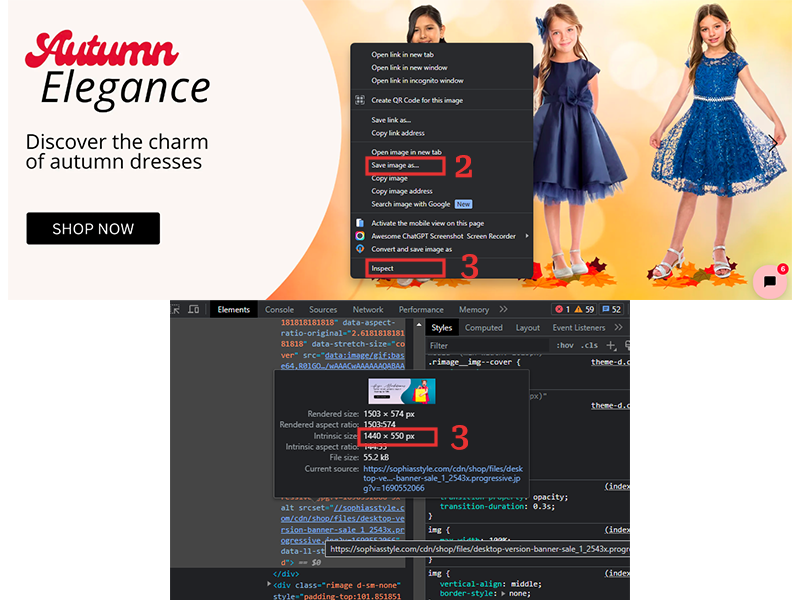
- Right-click on the image and save it on your computer then find the size details on the properties menu.
- Use a screenshot Chrome tool to approximate the size of an image, by measuring the pixels on the screen.
- Right-click on the image and choose Inspect on Chrome Browser.
- It’s also advisable to review your theme’s documentation for precise guidance on banner sizes.
What can go wrong when you don’t use the right image size?
- The image won’t fit properly into the space you want to display it. Content such as text and the call to action buttons can be hidden by being cropped out from the image.
- The image can display blurry pixels and affect the quality of the entire image to the extent of users not being able to read text or other information from the banner image.
What is the optimal file size in kilobytes for Shopify?
File size is the amount of storage space an image occupies, usually measured in kilobytes (KB) or megabytes (MB), and it’s a critical factor in your Shopify store’s performance. Large file sizes can lead to slow page load times, increased bandwidth usage, and a higher bounce rate as visitors lose patience and leave your site. It’s essential to compress your images to reduce their file size without sacrificing quality. There are tools that can help you achieve the perfect balance between image quality and file size like Tinypng.
Shopify recommends keeping the main banner images under 1 megabyte in size, while product photos should ideally be around 300 kilobytes.
Recommended Tools and Apps
Tinyjpg for image size in kilobytes optimization.
Canva for banner creation and image aspect ratio optimization.
Lightshot is a Chrome extension for screenshots.
PicWish for improving blurry images.
The Impact of Slow-Loading Images
User Experience and Bounce Rates
When images take too long to load, users are more likely to abandon your Shopify store, leading to higher bounce rates. A high bounce rate not only means lost opportunities for sales but also sends negative signals to search engines about your site’s quality.
SEO Implications
Optimized images not only improve your site’s speed but also contribute to a better user experience, which in turn boosts your SEO. Better image optimization leads to higher search rankings, which leads to more traffic and, ultimately, more sales.
Studies have shown that a one-second delay in page load time can lead to a 7% reduction in conversions. Optimizing images to load quickly and efficiently can significantly improve user experience, keeping potential customers engaged and more likely to make a purchase.
From the very first glance to the final checkout, the optimized images on your Shopify store have the power to create lasting impressions and drive revenue growth. As you implement the strategies shared in this article, you’re not just optimizing images; you’re optimizing success.
Frequently Asked Questions
1. Which image format is best for my Shopify store: JPEG, PNG, or WebP?
It depends on the use case. JPEG is the standard for high-quality photographs because it compresses well. PNG is essential for logos or graphics that require a transparent background. However, WebP is the modern winner; it provides the highest quality at the smallest file size. Shopify now automatically serves WebP versions of your images to browsers that support them to ensure maximum speed.
2. What are the recommended dimensions for Shopify product and banner images?
For product images, the “sweet spot” is 2048 x 2048 pixels, which allows for high-quality zooming without slowing down the site. For hero banners, dimensions vary by theme but typically range between 1440 x 540 pixels and 2500 x 750 pixels. Always check your specific theme documentation to ensure text and buttons don’t get cropped out on mobile devices.
3. How does image file size (KB/MB) actually impact my SEO rankings?
Search engines like Google use page load speed as a key ranking factor. Large image files (over 1MB) slow down your site, leading to a poor user experience and higher bounce rates. When users leave your site quickly, it sends a negative signal to search engines, which can lower your search visibility. Smaller, optimized files (under 300KB for products) keep your site fast and your rankings high.
4. What happens if I upload images that are too small or the wrong aspect ratio?
If an image is too small (under 800px), it may appear blurry or pixelated, especially on high-resolution “Retina” screens, which damages brand trust. If the aspect ratio is incorrect (e.g., using a square image in a rectangular banner slot), Shopify may crop out vital information, such as promotional text or “Shop Now” buttons, making the site look broken to visitors.
5. Are there free tools I can use to compress images without losing quality?
Yes, several highly effective tools exist. TinyPNG (or TinyJPG) is excellent for bulk-compressing images before uploading them. Canva is great for setting the correct aspect ratios and dimensions, while PicWish can help enhance images that appear slightly blurry. Using these tools ensures your site stays lean and professional without needing an expensive design suite.
Trackbacks/Pingbacks