Executive Summary
Customer support in European e-commerce is undergoing a massive shift. Across the industry, support teams are no longer acting as reactive cost centers that merely answer “Where is my order?” (WISMO) tickets. When set up correctly, AI-driven conversational commerce transforms customer experience (CX) into a primary sales engine.
By examining the latest European shopper data, side-by-side frameworks of good versus bad AI configurations, and real-world merchant case studies, a clear operational blueprint emerges. Here is an analysis of how leading brands are automating routine support while driving significant conversion lifts.
1. The European Shift: Shoppers Have Higher Intent and Higher AOVs
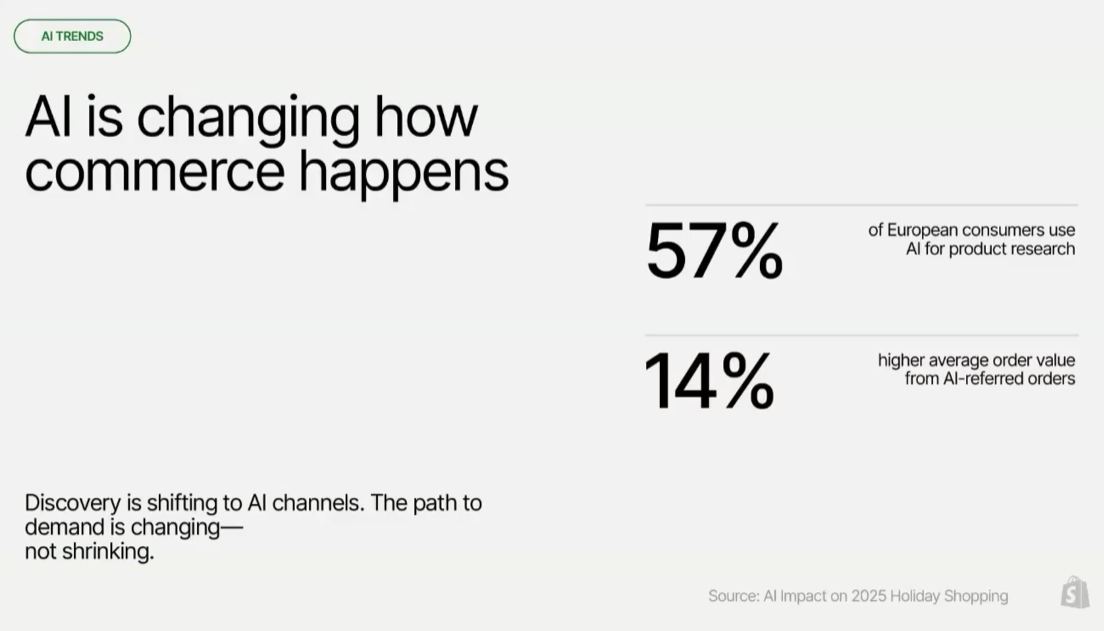
Shopper behavior is rapidly changing across Europe. Instead of relying on short, generic keyword searches, consumers are increasingly using descriptive, natural-language prompts to find exactly what they want.
One of the most fascinating data points from the presentation was how shopper behavior is changing across Europe. Shoppers are moving away from short, generic keyword searches and are instead using descriptive, natural-language prompts to find exactly what they want.
The Data Behind the Shift
- 57% of European shoppers now use AI for product research.
- 8x Increase in AI-Driven Traffic: Storefront traffic coming from AI recommendation channels has grown 8x year-over-year.
- 13x Growth in AI Search Orders: Orders originating from AI-powered searches have surged 13x year-over-year.
- 14% Higher Average Order Value (AOV): Shoppers arriving via AI channels are not just browsing; they have a 14% higher AOV than standard traffic because they arrive much further along in the buying cycle.
2. Unifying Support & Sales: Why Merchants Choose Gorgias + Shopify Plus
A critical strategy for scaling e-commerce brands is reducing “tab overload” and unifying systems. When merchants pair Gorgias with Shopify Plus, the integration impacts three distinct operational pillars:
| Objective | How It Works | Measurable Business Impact |
| Drive Revenue | 1:1 shopping assistance at scale: product recommendations, shade/fit advice, and tailored pre-sales discounts. | 70% of pre-sale questions handled instantly; +30% conversion rates. |
| Automate Support | Enabling Shopify Actions so AI can update shipping addresses, manage returns, and edit/cancel orders. | 60% of support tickets automated; 66% less cost than hiring additional staff. |
| Improve CX Efficiency | Centralizing email, chat, SMS, WhatsApp, and social DMs into an omnichannel helpdesk. | 44% higher lifetime value (LTV) through unified commerce and support data. |
Converting at the Final Mile: Chat at Checkout
One high-impact feature is embedding AI chat directly into the Shopify Checkout and Shop Pay flow. By answering last-minute friction questions (such as shipping timelines or return rules) right when the customer is ready to pay, brands are seeing up to a 50% higher checkout conversion.
3. The Core Strategy: “The Difference Isn’t the Tech, It’s the Setup”
A foundational rule of automating e-commerce support is that “AI is only as good as its trainer”.
Two brands using the exact same AI tool can experience wildly different results. The disparity in performance comes down entirely to configuration:
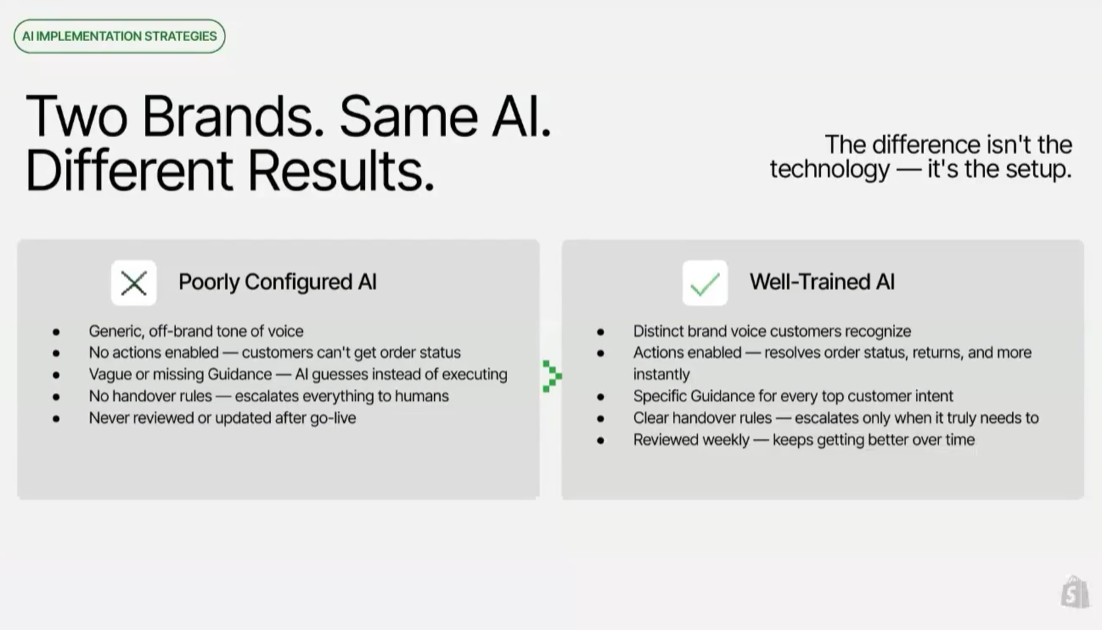
The 4 Elements of a “Good Setup”
- Define Clear Goals: Establish what success looks like (e.g., target automation rate or resolution time) before configuring any workflows.
- Enable Actions First: Actions give AI permission to perform tasks in Shopify. Every action skipped represents a whole category of tickets that will still require human intervention.
- Set Your Brand Voice: Define a specific persona so the AI does not sound like a robotic, off-the-shelf chatbot.
- Write Specific Guidance (Think SOPs, Not FAQs): Avoid pasting general FAQ text. Write conditional, step-by-step instructions exactly as one would train a human support agent.
Practical Example: Unconfigured vs. “AI-Ready” Guidance
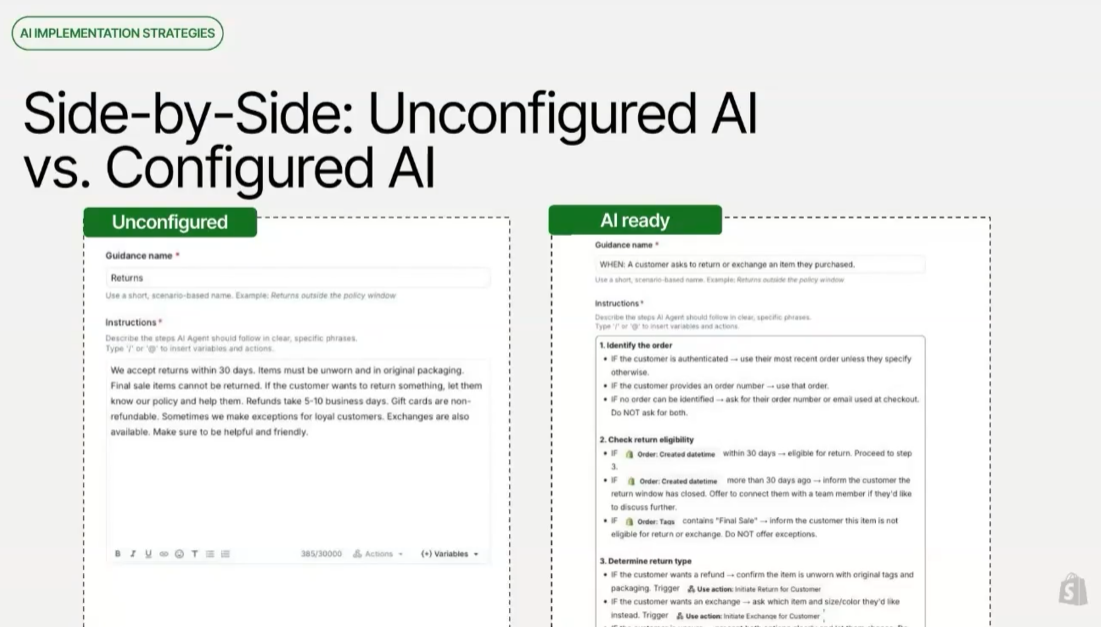
A side-by-side comparison of how an unconfigured bot handles a return request versus an “AI-Ready” setup illustrates the difference:
🔴 Unconfigured Guidance (What NOT to do)
“We accept returns within 30 days. Items must be unworn and in original packaging. Final sale items cannot be returned… Sometimes we make exceptions for loyal customers. Exchanges are also available.”
Why it fails: The AI simply regurgitates a block of text. It does not check the customer’s order date, verify product tags, or initiate backend workflows, forcing the shopper to figure out eligibility manually.
🟢 AI-Ready Guidance (How to structure it)
To get reliable automation, you shouldn’t paste static FAQ paragraphs into your AI. Instead, you must give it structured, conditional workflows that tell it exactly how to verify data and execute tasks.
4. The Blueprint: Three Pillars of AI Excellence
To achieve sustainable results, e-commerce teams must treat AI implementation as an ongoing lifecycle built across three distinct pillars:
Pillar 1: Setup (Setting Foundations & Enabling)
- Launch Fast: Define operational goals, configure tone of voice, enable backend actions, and get the AI Agent live across all channels quickly.
- Dedicate Implementation Time: Treat the setup as the product itself. Rather than waiting for a perfect build, turn the AI on early to gather data and iterate rapidly.
Pillar 2: Knowledge (Optimizing & Scaling)
Most brands already possess the knowledge needed to resolve customer inquiries—it is simply not structured in a way that AI can access reliably.
- Think in Intents: Provide specific Guidance for each question type, starting with the top 10 ticket types. Frame knowledge around standard operating procedures (SOPs) rather than static FAQs.
- Be Explicit + Specific: Write actual policies directly into the Guidance—including return windows, carriers, and exceptions—documenting the exact step-by-step actions a human agent would take.
- Expand Coverage Deliberately: Target a >78% coverage rate to prevent routine tickets from hitting human agents unnecessarily.
Pillar 3: Ongoing Refinement (Coaching & Iterating)
Because AI models do not train themselves automatically, teams must establish a consistent QA routine:
- Assign Ownership for QA: Dedicate team ownership for daily or weekly ticket reviews to audit responses and identify knowledge gaps.
- Keep Your Knowledge Base Fresh: Schedule regular audits so the AI’s instructions evolve alongside changing seasonal policies, shipping rules, and product catalogs.
5. Benchmarks & Red Flags
To evaluate AI performance effectively, brands should track their progress against key industry benchmarks and watch for specific operational warning signs.
Target Metrics to Aim For
- Coverage Rate $\ge$ 78%: The AI should understand and be able to address at least 78% of incoming customer questions.
- Automation Rate $\approx$ 60%: The percentage of support interactions fully resolved from start to finish without human intervention.
- CSAT Score $\ge$ 4.3 / 5.0: High-performing AI setups consistently maintain customer satisfaction scores of 4.3 or above.
Operational Red Flags 🚩
- AI isn’t live after 2 weeks: The initial setup scope is likely overcomplicated. Focus first on the top 10 ticket intents.
- Coverage rate drops below 78%: Knowledge gaps exist. New intents must be added to teach the AI new skills.
- CSAT drops below 4.0: The bot is likely guessing answers or failing to hand over complex exceptions to human agents smoothly.
- No reviews in 2 weeks: AI requires active maintenance. Teams should spend 30–60 minutes per week reviewing transcripts to refine instructions.
- Automation rate plateaus for 3+ weeks: Handover logs should be audited to identify recurring escalations that can be converted into automated actions.
6. Real-World Case Studies
Leading brands across different sectors demonstrate the measurable impact of structured AI deployments:
- Steve Madden: By structuring SOP guidance and enabling Shopify Actions, the brand automated 60% of its support inquiries, generating over $1,000,000 in support cost savings while drastically speeding up response times.
- Princess Polly: Leveraging a centralized helpdesk to manage high-volume social DMs and chat tickets, the brand significantly reduced resolution times and cut operational overhead.
- Bare Minerals: Deploying Gorgias AI on product pages to help shoppers find correct makeup shades and formulas drove a 5.5% lift in AOV—and resulted in a 0% return rate on AI-assisted orders.
If you’re looking to implement Gorgias or have any questions related to AI chats feel free to contact us and get in touch with a specialist and remember your AI is only as good as its trainer.