
Ask any Shopify developer about product bundle apps and you’ll usually get a wince before you get an answer. Bundles are one of the highest-leverage conversion tools in ecommerce, they lift average order value, move slow-moving stock, and give merchandisers a way to package a story instead of just a SKU. But historically, “install a bundle app” has meant one of two bad trades: either you get a clunky, off-brand widget bolted onto your product page, or you get a custom build that quietly wrecks your theme’s performance and leaves your inventory reports full of phantom numbers.
That trade-off isn’t necessary anymore, and the reason is architectural. FoxSell has become one of the more interesting case studies in the Shopify Plus ecosystem precisely because it doesn’t try to out-app the App Store, it leans on Shopify’s own native primitives, Shopify Functions and Metaobjects, and then gets out of the way. For agencies and in-house dev teams, that opens the door to something more valuable than a plug-and-play widget: a fully bespoke, heavily branded bundle builder that never touches inventory logic directly.
The Classic Bundle App Problem
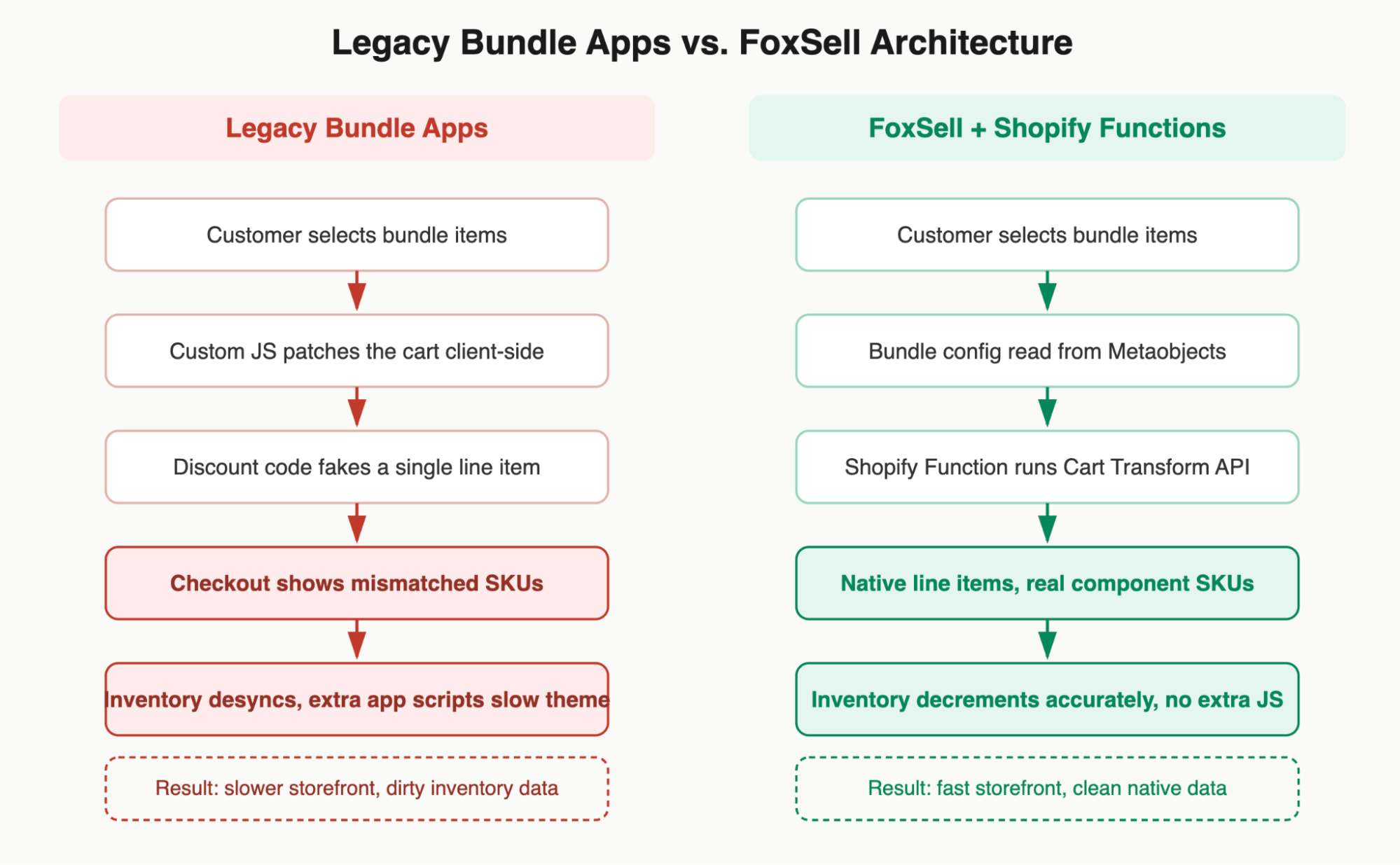
Most legacy bundle apps solve the “sell multiple products as one” problem the same way: they fake it. A discount code is generated behind the scenes, a chunk of custom JavaScript intercepts the cart to visually group line items, and the checkout is coached into displaying something that looks like a single bundle. It works, until it doesn’t.
The failure points are predictable:
- Storefront bloat. Every one of these apps injects its own script tags, CSS, and often a full re-render of the cart drawer. Stack two or three bundle-adjacent apps together and your Core Web Vitals start to suffer, which matters directly for conversion and for Shopify’s own theme-store performance scoring.
- Inventory drift. Because the “bundle” is a discount wrapper rather than a real set of line items, Shopify’s own inventory ledger often has no idea what actually left the warehouse. Merchants end up reconciling stock manually, and demand forecasting tools choke on the noisy data.
- Fragile checkout behavior. Discount-code-based bundles tend to misbehave the moment a customer stacks another promo code, uses a different payment method, or buys the bundle alongside other products. Tax, shipping, and returns logic, all built around real line items, has to be patched around after the fact.
None of this is a knock on the merchants who’ve used these apps, for a long time, they were the only option. But the underlying pattern, hide the real transaction from Shopify, then work around the consequences, is exactly what a native-API approach avoids.
How FoxSell Does It Differently
FoxSell‘s core architectural decision is to never fake the transaction. Instead of a discount code, a bundle purchase runs through Shopify’s Cart Transform API, a Shopify Function that can programmatically rewrite what’s in the cart at checkout time, splitting one “bundle” purchase into its real, individual component SKUs. The customer still sees one clean bundle in their cart; Shopify’s back end sees exactly what it needs to see: real products, real variants, real inventory movement.
The second piece is Metaobjects and metafields. Rather than storing bundle configuration in a proprietary database that only the app can read, FoxSell writes the bundle’s structure, which products are included, in what combinations, at what price logic, directly into Shopify’s native metaobject system. That single decision is what turns FoxSell from “another bundle app” into a genuine development platform: because the data lives natively in Shopify, any developer with API access can read it, extend it, or build an entirely different presentation layer on top of it, without ever touching FoxSell’s own admin UI.
This is also why inventory stays clean. A Build-Your-Own-Box bundle with six components decrements six real SKUs. Reports, ERP syncs, and demand forecasting all see the truth, because the truth is what actually got written to Shopify.
Going Custom: A Bespoke Builder on the Storefront API
Here’s where it gets interesting for agencies. FoxSell’s out-of-the-box bundle widgets are solid for most merchants, but Shopify Plus brands, particularly in beauty, food, and apparel, often want something that doesn’t look like an app at all. Think of the aesthetic ambition of a luxury confectioner’s gift-box configurator: think Ladurée-level polish, pastel motion design, a build-your-own experience that feels like part of the brand rather than a bolted-on utility.
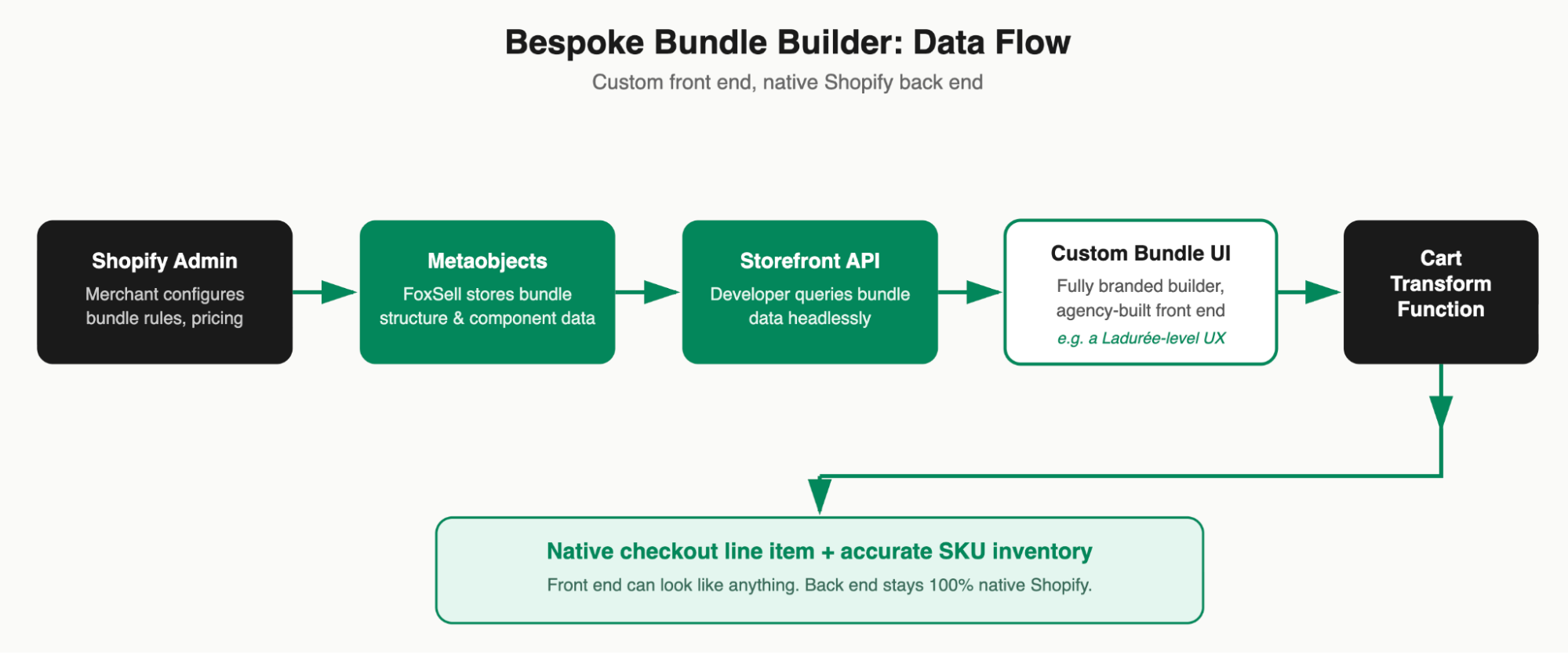
Because FoxSell’s bundle data lives in native metaobjects, a development team isn’t limited to the app’s own front end. Using Shopify’s Storefront API, a developer can query the same bundle definitions, available components, pricing rules, variant constraints, and render them inside a completely custom interface: a drag-and-drop gift box builder, a step-by-step “build your skincare routine” flow, an animated packaging preview, whatever the brand’s creative direction calls for.
Crucially, none of that custom front-end work touches the part that’s hard to get right. The finished selection still gets submitted through the same Cart Transform Function, which means the bespoke UI inherits all of the native checkout, tax, and inventory behavior for free. The agency’s job shrinks to what it’s actually good at, brand-grade front-end experience, while FoxSell’s infrastructure quietly handles the commerce logic underneath.
In practice, this pattern looks like:
- Merchandising team configures bundle rules in FoxSell’s admin, as usual.
- Bundle structure is written to Shopify Metaobjects automatically.
- The custom storefront queries that data via the Storefront API, headless, or embedded inside an Online Store 2.0 theme section.
- The agency-built interface handles all visual design, animation, and UX logic.
- On “add to cart,” the Cart Transform Function resolves the bundle into real line items, so checkout, inventory, and fulfillment stay 100% native.
The Business Opportunity: Bespoke Bundle Builder Development
For a Shopify Plus agency, this architecture is the difference between a support ticket and a service line. Once a client understands that their bundle experience no longer has to look like everyone else’s app widget, and that going custom doesn’t introduce any of the inventory or performance risk that used to come with a fully custom build, the conversation shifts from “can you fix our bundle app” to “can you build us something no competitor has.”
That’s a sellable, high-margin engagement: bespoke custom bundle builder development, positioned not as app configuration but as a front-end product in its own right, backed by infrastructure the agency doesn’t have to maintain. Because FoxSell owns the commerce logic, inventory accuracy, and checkout compliance, the agency’s scope of work, and its liability, stays cleanly focused on the experience layer: UI, animation, personalization logic, and merchandising features like cross-sell recommendations inside the builder itself.
For brands already investing in a strong visual identity, the kind of client who cares whether their gift-box flow feels premium, this is a natural upsell sitting on top of infrastructure they’ve likely already installed. The pitch essentially writes itself: same rock-solid inventory and checkout behavior, a front end that actually looks like the brand.
The Takeaway
The old assumption, that a highly polished bundle experience necessarily means bloated code or messy inventory, was really an artifact of how legacy apps were built, not a law of Shopify development. By building on Shopify Functions and Metaobjects instead of discount-code workarounds, FoxSell demonstrates that “native” and “custom” aren’t opposites. For development teams willing to go one layer deeper with the Storefront API, that opens up a genuine service opportunity: bundle experiences that are as bespoke as the brand demands, running on infrastructure clean enough that nobody on the ops team ever has to think about it again.