
Gorgias is a customer support platform tailored specifically for e-commerce businesses. It acts as a central hub, gathering customer interactions from various channels like email, live chat, and social media into one unified interface. This architecture allows support teams to manage and resolve inquiries efficiently without constantly switching tabs.
The true operational advantage materializes when you bridge the technical gap between your helpdesk and your retention tech stack. Synchronizing Gorgias with premier Shopify email marketing platforms, such as Klaviyo, transforms customer data into a sustainable revenue driver. This integration streamlines customer service and drastically enhances the overall customer experience by bridging the gap between support data and retention marketing.
⚙️ TL;DR: Maximizing Retention with Gorgias & Klaviyo
- Support is a Core Marketing Channel: Integrating your helpdesk with your ESP shifts your customer service team from a cost center to a marketing engine. Support data provides the absolute highest-intent signals for customer state and sentiment.
- Data-Driven Event Synced: Native integration bridges critical support events—such as Opened Ticket, Resolved Ticket, and Completed Survey—directly into Klaviyo profiles, allowing you to trigger automated messaging based on resolution state.
- Automate the Post-Resolution Window: Don't leave customer satisfaction to chance. Build high-impact automation flows (like Post-Ticket product recommendation flows, Order Info updates, and CSAT Survey follow-ups) that fire as soon as support tickets close.
- Mitigate Churn with Auto-Tagging: Set rules in Gorgias to auto-tag accounts by topic or sentiment. Use these tags in Klaviyo to segment users, pause bulk sales pitches for frustrated buyers, or trigger special high-touch retention workflows for customers with open tickets.
- Action: Complete the 10-minute Gorgias-Klaviyo API handshake this week. Build a basic "Resolved Ticket" flow in Klaviyo that triggers a friendly, plaintext CSAT survey request 2 hours after a support rep resolves a case.
1. How to integrate Gorgias with Klaviyo
Integrating Gorgias with Klaviyo allows you to harness customer support data to drive targeted marketing efforts. Here’s a step-by-step guide to the integration:
- In Klaviyo, go to Integrations-> Add Integration and search for Gorgias in the upper left corner.
- Click on the Gorgias box and then Connect to Gorgias button.
- Enter your helpdesk URL into the Gorgias Helpdesk URL field in the format yourdomain.gorgias.com (you can see your domain in your Gorgias login page in the address bar).
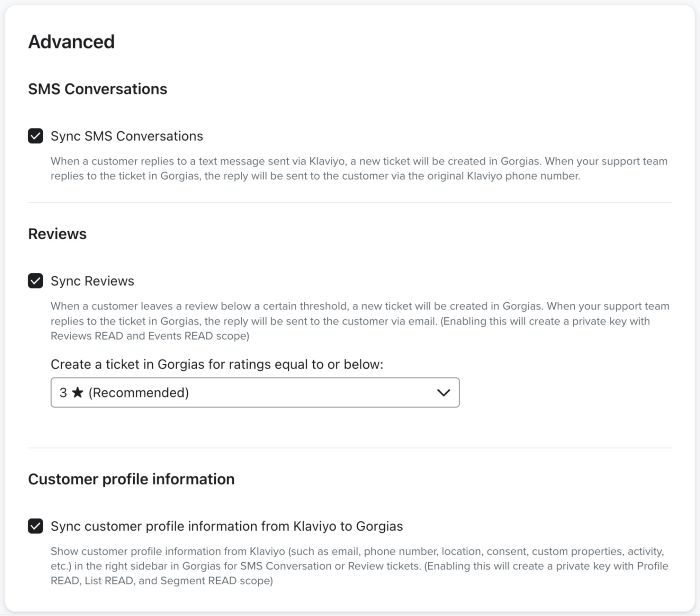
Select Sync SMS Conversations if you want to use the integration’s SMS help desk functionality.
Check Sync reviews and select a threshold if you want to use the integration’s reviews functionality.
Check Sync customer profile information from Klaviyo to send contacts’ email addresses, phone numbers, profile properties, and more into Gorgias. - Click Complete Setup. This will open a new tab where you will be required to log into your Gorgias account.
- Once logged in, select All resources and Authorize the connection.
- Review the values and click Confirm.
- Click Connect to Gorgias to finish the integration.
All of your contacts in Gorgias will now create Klaviyo profiles, so you can add them to your lists and segments. Also, if you’ve selected the SMS, Reviews, and Customer profile information options in step 3, you will see SMS and Reviews tickets, as well as customer attributes in the ticket sidebar.
2. What data is sent to Klaviyo
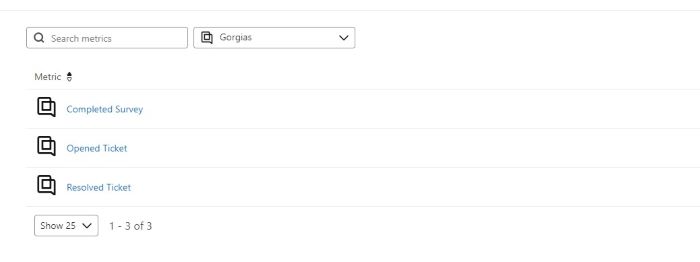
Once Gorgias is integrated with Klaviyo, key data points are transmitted between the platforms to enhance marketing and customer relationship management. These events sync with Klaviyo:
- Opened Ticket
- Resolved Ticket
- Completed Survey
Each event is stored with the associated customer profile. If a profile doesn’t exist in Klaviyo, one will be created. When viewing a specific profile, you’ll see details such as:
- Who the ticket was assigned to
- Ticket ID and URL
- Channel (SMS or email)
- Message content
Additionally, any customer tags you assign in Gorgias are synced with Klaviyo, enabling segmentation and targeted marketing campaigns.
Case Study
For one of our clients, we successfully integrated Gorgias with Klaviyo to streamline their customer support and enhance their email marketing strategy. Here’s how we leveraged this integration:
Step 1: Capture New Email Addresses
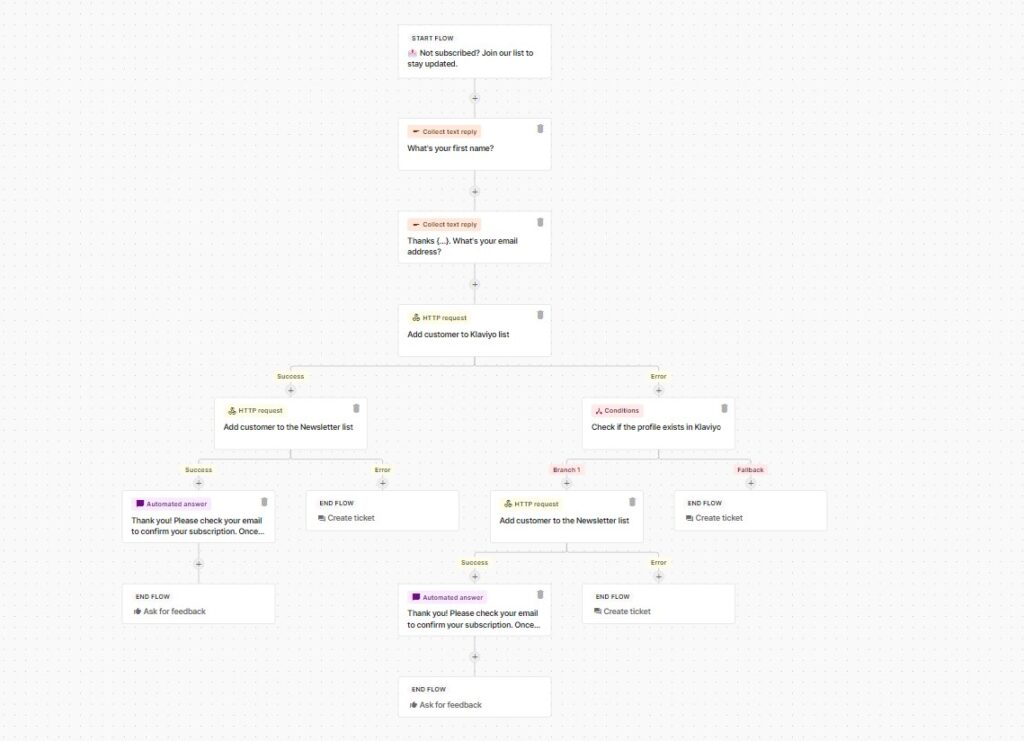
The absolute first step was creating a reliable mechanism to capture and subscribe new email addresses to the client’s newsletter. We designed and set up an automation where users were prompted to enter their name and email address upon clicking a specific button within the live chat.
If the user was not already living in Klaviyo, a new profile was automatically generated. Through a complex HTTP request built by our dev team, these users were automatically added to the newsletter list. Because we prioritize high deliverability, we implemented a strict double opt-in process, meaning they had to confirm their subscription via a secondary confirmation email. After successful verification, these new leads were funneled directly into the foundational welcome automation sequence to initiate a highly personalized nurture journey.
Step 2: Create Targeted Email Flows
Utilizing the data sent from Gorgias to Klaviyo, we developed four key email flows:
- Post-Ticket Follow-Up Flow: Triggered by the “Resolved Ticket” event, this flow sent a thank you message and product recommendations based on the customer’s inquiry after a ticket was closed.
- Additional Order Information Follow-Up Flow: Also triggered by the “Resolved Ticket” event, this flow followed up with additional information about the customer’s order, offering further assistance if needed.
- Survey Response Flow: Depending on the customer’s survey score, they received a follow-up email either requesting further feedback or thanking them and inviting them to engage with our social channels.
- High-Ticket Volume Flow: For customers who opened multiple tickets within a certain period, we created a retention flow offering them a discount and additional customer support to prevent churn.
Step 3: Auto-Tagging and Segmentation
We also implemented rules within Gorgias to auto-tag customers based on their messages. These tags were then synced with Klaviyo, enabling us to create highly targeted segments. With these segments, we sent personalized email campaigns that resonated with the customers’ specific needs and behaviors.
Ready to Transform Your Customer Support and Email Marketing?
By integrating Gorgias with Klaviyo, you can seamlessly leverage customer support data to boost your marketing strategy and improve segmentation.
eCommerce Today is here to help you unlock the full potential of this powerful integration.
Contact us today for a personalized consultation!
Frequently Asked Questions
1. How do Gorgias and Klaviyo work together?
Gorgias and Klaviyo integrate to share customer support data with your marketing platform. This allows brands to use helpdesk metrics, like resolved tickets and survey scores, to trigger highly targeted email flows and improve customer segmentation.
2. What specific data events sync from Gorgias to Klaviyo?
When integrated, Gorgias sends three core events to Klaviyo: Opened Ticket, Resolved Ticket, and Completed Survey. It also syncs the ticket assignee, ticket ID, message content, and customer tags.
3. Can I capture newsletter subscribers through Gorgias chat?
Yes. You can set up an automation in Gorgias where users are prompted to enter their email in the live chat. Using an HTTP request, this data can automatically create a new profile in Klaviyo and add the user to your newsletter list.
4. What is a Post-Ticket Follow-Up Flow?
A Post-Ticket Follow-Up Flow is an automated Klaviyo email sequence triggered when a Gorgias ticket is marked as “Resolved.” It typically sends a thank you message and can include personalized product recommendations based on the customer’s previous inquiry.
5. How does Gorgias auto-tagging improve email marketing?
By setting up rules in Gorgias to automatically tag customers based on their message content, those tags sync directly to Klaviyo. Marketers can then use these tags to build highly specific segments and send personalized email campaigns tailored to exact customer needs.