
Stop Treating GSC Like a “Tech Tool”
Let’s be honest. You probably installed Google Search Console the day you launched your Shopify store. You looked at the “Performance” graph once, saw a few squiggly lines, and never logged in again.
That is a mistake that is costing you thousands of dollars in lost revenue every month.
While Google Analytics (GA4) tells you what happened after a user arrived on your site, Google Search Console tells you about the people you missed. It tells you who almost bought from you but clicked on a competitor instead.
At eCommerce Today, we don’t view GSC as a debugging tool. We view it as a Revenue Map. For our Managed Services clients, GSC is the “North Star” that guides our content and technical strategy. We don’t just look for 404 errors; we look for “revenue leaks.”
🔍 TL;DR: The GSC Revenue Map
- Beyond "Tech Support": Stop treating Google Search Console as a debugging tool; it is a "Revenue Map" that reveals the customers you almost reached but lost to competitors.
- Mining for Money Keywords: Use GSC data to identify "Page 2" opportunities—keywords where you have high impressions but low clicks—to prioritize high-ROI content updates.
- Stopping Revenue Leaks: Identify and fix keyword cannibalization between product variants and technical crawl errors that act as invisible barriers to conversion.
- Strategic Growth System: Smart operators align GSC insights with their broader Shopify + Lifecycle system to ensure every organic visitor is funneled toward a transaction.
- Action: Audit your "Performance" report against our Revenue-First framework to transition from "Search Visibility" to "Search Profitability."
1. The “Page 2” Goldmine Strategy (Striking Distance Keywords)
The quickest win in SEO isn’t ranking for a new keyword. It is ranking higher for a keyword you are already known for.
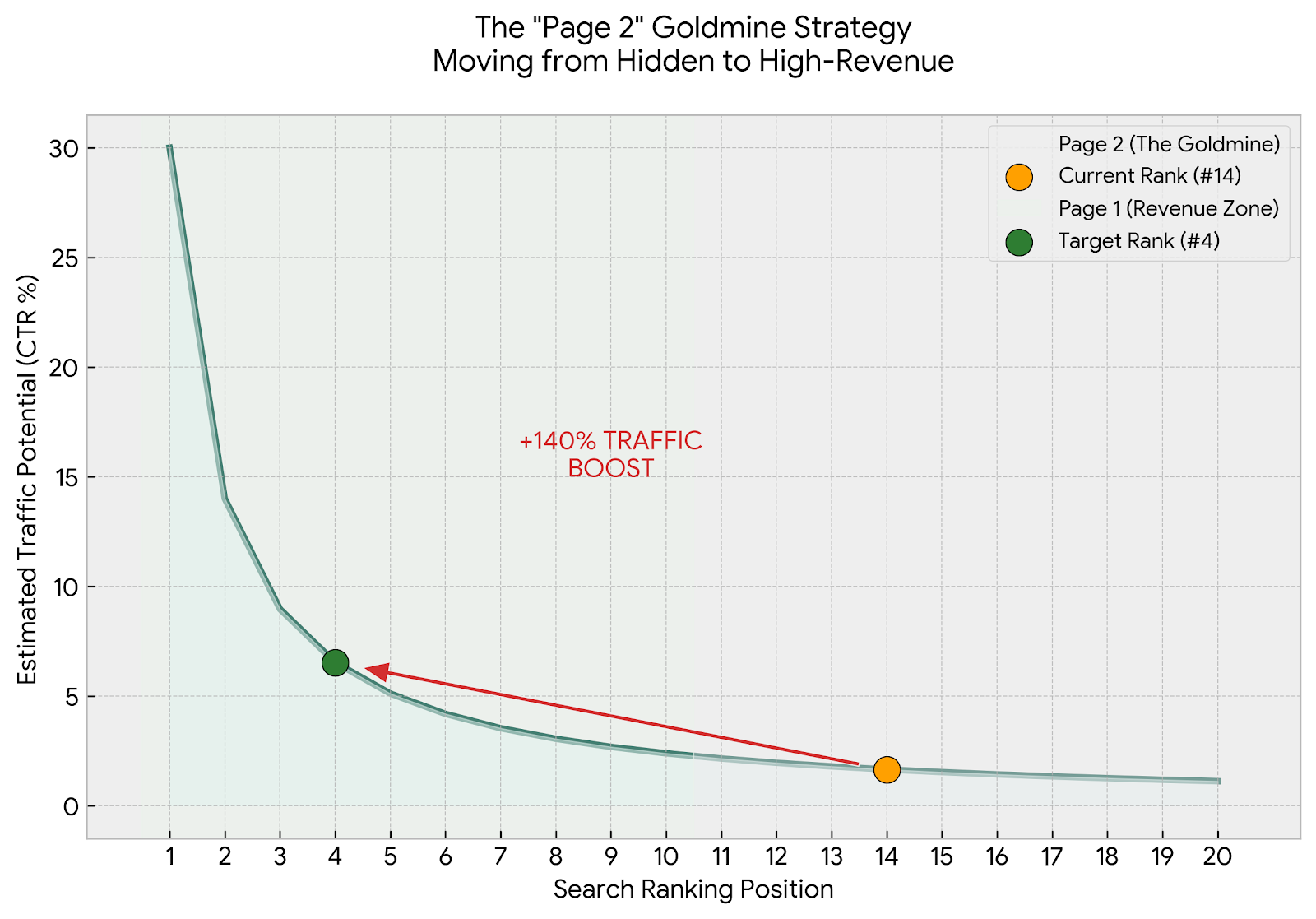
You are likely ranking in positions https://www.google.com/search?q=%2311–https://www.google.com/search?q=%2320 (Page 2) for dozens of high-intent keywords without even knowing it. These are users actively searching for your exact product, but Google hasn’t quite decided if you are the authority yet.
The Scenario: Let’s say you sell “Organic Dog Treats.” You check GSC and filter by “Position.” You discover that a specific Product Page is ranking https://www.google.com/search?q=%2314 for the query: “Best hypoallergenic dog treats for Pugs.”
Currently, your H1 title is just: “Organic Dog Treats – Beef Flavor.” Google is trying to rank you for the “Pug/Hypoallergenic” angle, but your content isn’t supporting the algorithm.
The Fix: We don’t guess; we optimize based on data.
- Identify: We download the GSC query report and filter for positions 11-20.
- Optimize: We update the H2 headers and product description on that page to explicitly include the missing terms. We might add a section called “Why these are the best hypoallergenic treats for Pugs.”
- Link: We create internal links from your blog or homepage to this specific product using the exact anchor text.
Business Impact: Moving from Position https://www.google.com/search?q=%2314 (Page 2) to Position https://www.google.com/search?q=%234 (Page 1) typically results in a 140% traffic increase. This is “free” traffic that lowers your blended Customer Acquisition Cost (CAC) immediately.
2. Fixing “Keyword Cannibalization” (The Silent Killer)
Shopify is an amazing platform, but its default URL structure creates a massive SEO problem: Duplicate Content, also known as Keyword Cannibalization.
The Problem: Shopify often creates two distinct URLs for the exact same product:
- /products/mens-leather-jacket (The canonical product URL)
- /collections/mens-jackets/products/mens-leather-jacket (The collection-path URL)
When you look at GSC, you might see that both of these URLs are fighting for the keyword “Mens Leather Jacket.” Because Google sees two identical pages, it gets confused. It splits the “ranking juice” between them, and consequently, neither page ranks well.
The Solution: This requires a technical fix, not a content fix.
- Canonical Tags: We ensure your theme’s code is set to properly “canonicalize” the collection URL back to the main product URL. This tells Google: “Ignore the collection path; the main product page is the only one that matters.”
- Consolidation: If you have a “Collection” page and a “Product” page competing for generic terms, we use GSC data to decide which one has better engagement. We then de-optimize the loser or 301 redirect it to the winner.
Why You Need a Team: Modifying theme.liquid files or implementing 301 redirects incorrectly can de-index your entire store. This is why the Fractional Ecommerce Team model is safer than DIY guessing. Our developers handle the code while our SEO strategists handle the logic.
3. The “Zero-Click” Audit: Fixing Low CTR
Are you ranking https://www.google.com/search?q=%231 but getting no traffic? This is becoming common in 2026 due to AI Overviews and rich snippets.
The Diagnosis: You check GSC and see a keyword with:
- Impressions: 5,000
- Position: 3.2
- CTR (Click-Through Rate): 0.5%
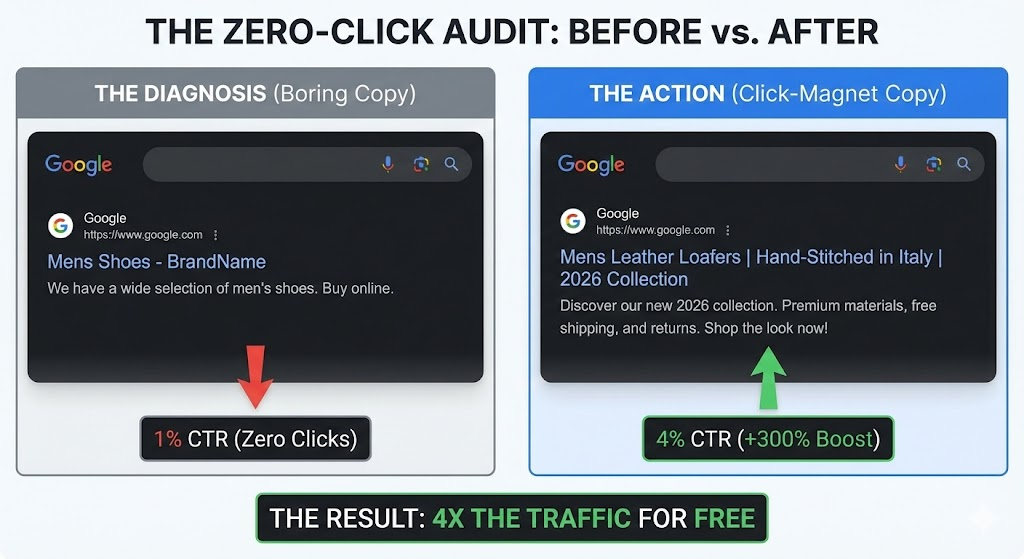
This means people see you, but they aren’t clicking. Why? Usually, it’s because your Meta Title and Description are boring, automated placeholders like: “Mens Shoes – BrandName.”
The Action: We treat Metadata like ad copy. We rewrite your snippets to be “Click-Magnets.”
- Before: Mens Leather Loafers – BrandName
- After: Mens Leather Loafers | Hand-Stitched in Italy | 2026 Collection
We also implement Schema Markup (JSON-LD) to ensure your price, review stars, and “In Stock” status appear directly in the search results.
The Result: We often see CTR jump from 1% to 4% just by changing the text snippet. That is effectively 4x the traffic without changing a single thing on your website.
4. Merchant Listings & The “Shopping Graph”
In 2026, Google is no longer just a search engine; it is a marketplace. The “Shopping” tab and the “Popular Products” grid on the main search page drive massive volume for Shopify stores.
GSC now has a dedicated section called “Shopping” (Merchant Listings).
The Opportunity: If your products have warnings in this section (e.g., “Missing field: shippingDetails” or “Invalid GTIN”), Google will suppress your products from the visual shopping grid. You are invisible to shoppers who browse by image.
The Fix: Our team monitors the “Merchant Listings” tab weekly.
-
- GTIN/Barcode Fixes: We ensure every variant has a proper barcode.
- High-Res Image mapping: We ensure Google is pulling the high-resolution lifestyle image, not the low-res thumbnail.
- Return Policy Schema: We code your return policy into the schema so it displays “Free 30-Day Returns” right on the Google result.
5. Technical Health: The Foundation of Scale
You can have the best copywriting in the world, but if Google’s bots (crawlers) cannot index your site, you are invisible.
XML Sitemaps & App Bloat: Shopify generates a sitemap.xml automatically, which is great. However, whenever you delete an app, it often leaves behind “ghost code” or broken URL paths. We monitor GSC for “Submitted URL not found (404)” errors.
- The Strategy: If you discontinue a best-selling product, do NOT just delete the page. That creates a 404 error and kills the SEO value that the page built up over the years.
- The Pivot: We implement a 301 Redirect, sending that traffic to the closest relevant Collection page or the new version of the product. This preserves your “link equity.”
Mobile Usability: GSC has a strict “Mobile Usability” report. It alerts you if:
- “Clickable elements too close together.”
- “Content wider than screen.”
- “Text too small to read.”
When these alerts trigger, we don’t wait. We pass them directly to our CRO Developers to fix the UX immediately. If Google thinks your site is annoying on mobile, they won’t rank it.
6. Intent Analysis: Reading the User’s Mind
Finally, GSC is a crystal ball for content strategy. Users often search for problems, not products.
The Insight: You might see queries in GSC like: “How to clean white leather sneakers without ruining them.” If you sell sneakers, but you don’t have a blog post answering this, you are losing a customer. Google is telling you what content to write.
The System:
- We export the “Question Queries” (Who, What, Where, How) from GSC.
- Our content team writes a high-value blog post answering that exact question.
- Inside that blog post, we feature your “Leather Cleaning Kit” or the sneakers themselves. This captures the user at the “Top of Funnel” (Awareness) and moves them to “Bottom of Funnel” (Purchase).
Why “Set It and Forget It” Doesn’t Work
SEO is not a one-time setup. It is a monthly race. Your competitors are optimizing their GSC data right now. They are fixing their 404s, rewriting their titles, and stealing your “Page 2” keywords.
At eCommerce Today, we include monthly GSC Audits in our Managed Services Retainer. We don’t send you a confusing 50-page PDF report generated by a tool. We send you a list of actions: “We fixed 15 cannibalization errors, rewrote 10 meta descriptions, and redirected 5 dead products. Here is your 12% traffic gain.”
Stop guessing. Start ranking.
Frequently Asked Questions
Q: How do I verify my Shopify store on Google Search Console?
A: The easiest method is to copy the HTML tag from GSC and paste it into the <head> section of your theme.liquid file. Alternatively, if you use Google Analytics, you can verify automatically using the same account.
Q: What is keyword cannibalization on Shopify?
A: Keyword cannibalization happens when multiple pages on your store (e.g., a collection page and a product page) compete for the same keyword. This confuses Google and lowers the ranking of both pages. You can find this in GSC by checking if multiple URLs rank for the same query.
Q: How often should I check Google Search Console?
A: For a growing Shopify store, you should check GSC weekly. Look for sudden drops in “Total Clicks” (which might indicate a technical error) and review “New Errors” in the Coverage tab.
Q: Why are my Shopify products not indexing on Google?
A: Common reasons include: the product is set to “Draft” in Shopify, the “noindex” tag is active in your theme code, or you haven’t submitted your sitemap.xml to Google Search Console yet.
Q: Can Google Search Console help with conversion rate?
A: Indirectly, yes. GSC highlights “Mobile Usability” errors (like content wider than the screen or clickable elements too close together). Fixing these improves the user experience, which directly boosts mobile conversion rates.