
Stop Treating GSC Like a “Tech Tool”
Let’s be honest. You probably installed Google Search Console the day you launched your Shopify store. You looked at the “Performance” graph once, saw a few squiggly lines, and never logged in again.
That is a mistake that is costing you thousands of dollars in lost revenue every month.
While Google Analytics (GA4) tells you what happened after a user arrived on your site, Google Search Console tells you about the people you missed. It tells you who almost bought from you but clicked on a competitor instead.
At eCommerce Today, we don’t view GSC as a debugging tool. We view it as a Revenue Map. For our Managed Services clients, GSC is the “North Star” that guides our content and technical strategy. We don’t just look for 404 errors; we look for “revenue leaks.”
Here is the exact, step-by-step audit framework we run to turn data into cash.
Key Takeaways
- Performance Tracking: Monitor how your Shopify store ranks in both traditional search and AI-generated overviews.
- Crawl Health: Regularly check the Indexing report to ensure Google and LLMs can “read” your products.
- Sitemap Submission: Help search engines discover new products and collections instantly.
- Data Integration: Link GSC with Google Analytics 4 (GA4) for a 360-degree view of the customer journey.
- The Senior Advantage: Understand why a fractional team handles GSC nuances better than a solo founder.
Understanding The Role Of Google Search Console In SEO Optimization
Overview Of Google Search Console
Google Search Console (GSC) is a free tool that acts as the “health monitor” for your website. It shows you how often your site appears in search results, which keywords bring visitors, and how many clicks you get. In 2026, GSC will also provide critical data on Core Web Vitals and Merchant Center status.
Importance For Shopify Stores
For Shopify stores, GSC is crucial. It helps you understand why your site is performing the way it is. Here are some key reasons why GSC is important:
- Identifies Technical Debt: Alerts you to broken links or mobile usability issues that hurt conversion.
- Tracks Real Growth: Move beyond “vanity metrics” and see exactly which SKUs are driving interest.
- AI Visibility: GSC helps you see if your content is structured enough for AI crawlers to summarize your brand.
Deep Dive: As search evolves, understanding how your brand appears in AI-driven results is non-negotiable. Learn more about the real shift in making AI visibility measurable.
Key Features To Leverage
GSC has several features that can help you optimize your Shopify store:
| Feature | Description | Business Outcome |
| Performance Report | Clicks, impressions, and CTR. | Identifies “low-hanging fruit” for CRO. |
| Indexing Report | Status of pages in Google’s index. | Ensures all products are buyable via search. |
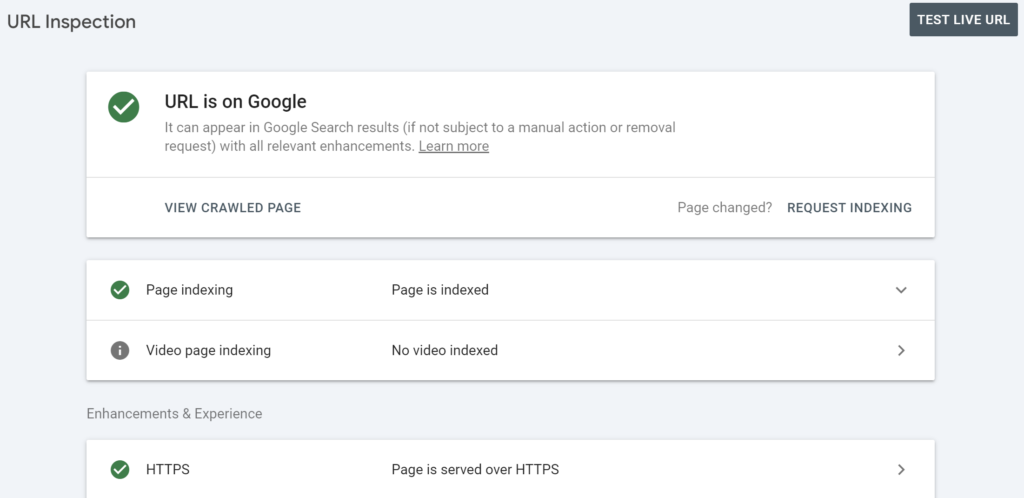
| URL Inspection | Real-time view of a specific page. | Instant troubleshooting for new launches. |
| Core Web Vitals | Speed metrics (LCP, INP). | Reduces bounce rates and improves UX. |
| Merchant Listings | Rich result status for products. | Boosts CTR with price/rating snippets. |
Performance Report

Applying the “eCommerce Today” Filters
To make your data actionable, you need to filter out the noise. We recommend:
- Exclude Branded Traffic: If your business is “X Pet,” filter out queries containing your brand name. This shows you how many new customers are finding you through generic terms like “organic dog food.”
- Primary Geography: Filter by your main market (e.g., Romania or UK) to ensure your SEO strategy isn’t being skewed by irrelevant global traffic.
- The “Gap” Filter: Look for pages with high impressions but low CTR. This is a clear signal that your Meta Titles need a direct, no-BS rewrite.
Exclude brand traffic
My business is called x pet, so you will filter anything that mentions “x pet”
To do this, you will add a new filter (next to the type and duration).

- Click New > Query > Queries not containing.
- Type “x pet” then click Apply.
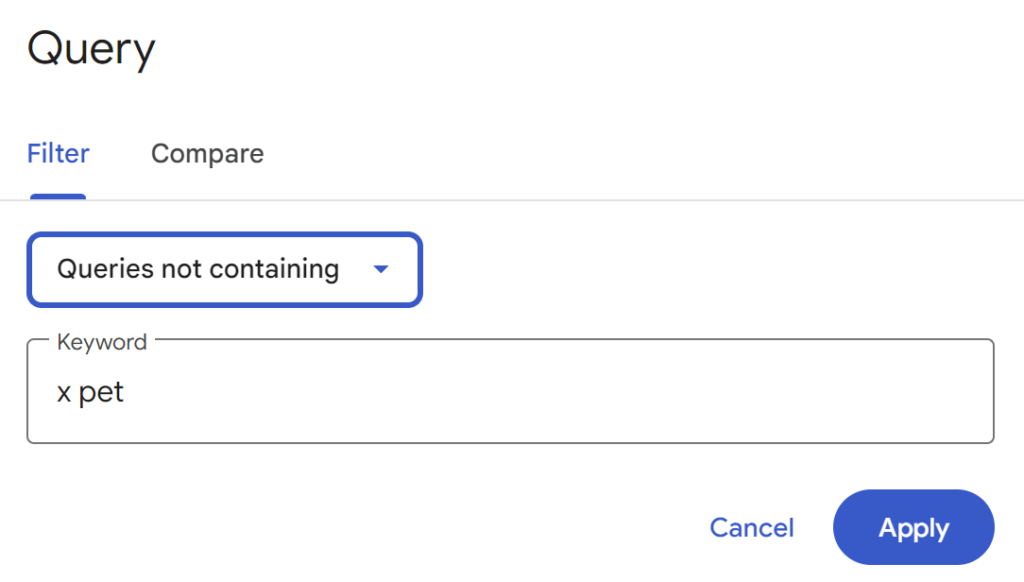
Do this for your brand name now. If you review the results, you should not see any branded traffic.
Filter to the primary target geography
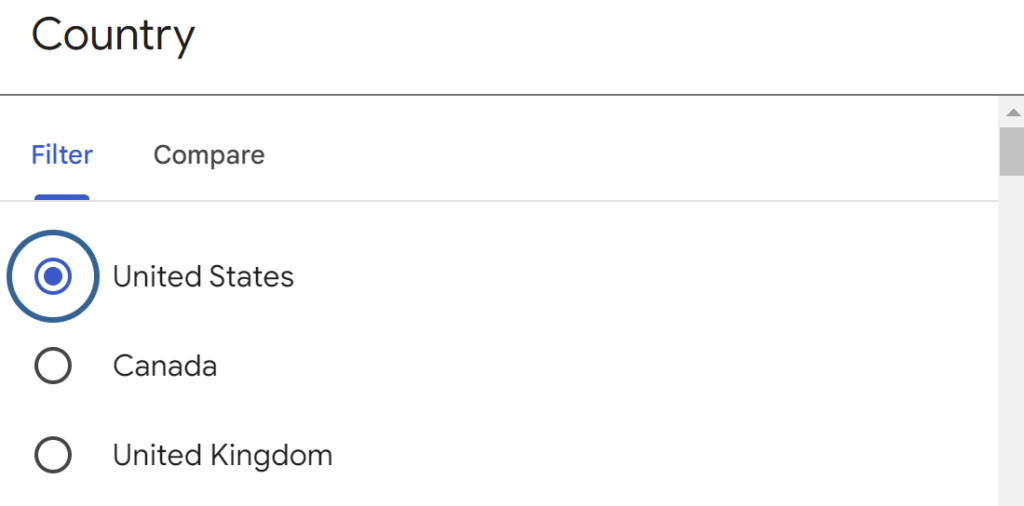
By default, the results shown here will be everything, everywhere, which can skew your results. The best option is to filter this by your primary geography, so you will look at the UK only for this account.
Click New > Country.
Select your country (here I am selecting “Romania”) then click Apply.
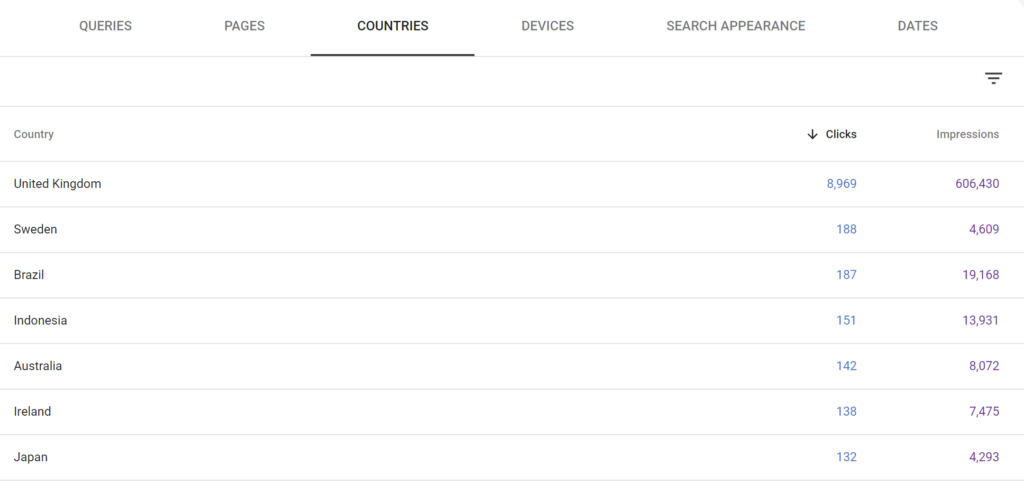
Countries Report
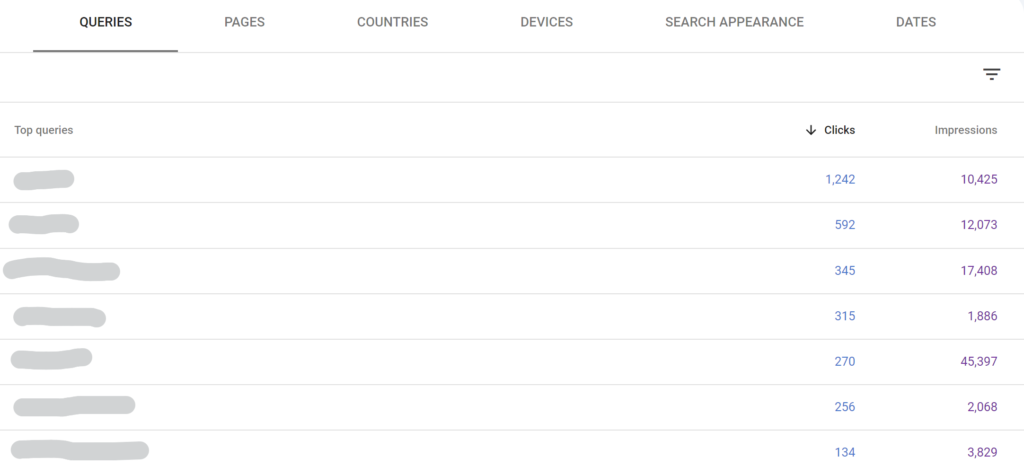
Keywords Report
URL Inspection for specific page
By using Google Search Console effectively, you can turn data into actionable insights that enhance your SEO efforts and drive more relevant traffic to your Shopify store.
In summary, Google Search Console is a powerful tool that allows you to effectively monitor your website’s performance, identify critical issues, and optimize its visibility in search results.
Integrating Google Search Console With Your Shopify Store
Integrating GSC is straightforward, but doing it correctly is key for clean data.
Step-By-Step Integration Guide
- Log into your Shopify admin panel.
- Navigate to Online Store > Preferences.
- Scroll to the Google Search Console section.
- Note for 2026: Most stores now use the Google & YouTube App for a seamless sync.
- Alternatively, use the HTML Tag method: Copy the meta tag from GSC and paste it into your theme.liquid file under the <head> section.
Verifying Your Store
Verifying ownership allows you to see the “behind the scenes” of your site. This is where a Senior Team adds value, by analyzing the verification of sub-domains or international versions of your store (e.g., ro.yourstore.com) to ensure global SEO health.
Integrating Google Search Console with your Shopify store is not just a one-time task; it’s an ongoing process that can significantly enhance your store’s visibility in search results. Regular monitoring and updates are key!
Utilizing Performance Data For SEO Optimization
Analyzing Your Store’s Performance
To improve your Shopify store’s SEO, it’s crucial to analyze how well your site is performing. By looking at the data from Google Search Console, you can see which pages are attracting visitors and which ones need work. This helps you focus on the areas that will make the biggest difference.
Identifying Underperforming Content
Using Page Section from Performance, you can see results:

You can find content that isn’t doing well by checking the performance data. For example, if a blog post has many views but few clicks, it might need a better title or description. Here’s how to improve these pages:
- Update the meta descriptions.
- Enhance the content quality.
- Optimize for more relevant keywords.
Refining SEO Campaigns Based On Data
Using the insights from Google Search Console, you can refine your SEO strategies. For instance, if you notice certain keywords are bringing in traffic, you can:
- Adjust your product descriptions to include these keywords.
- Create more content around these topics.
- Focus on improving pages that aren’t ranking well.
By effectively using performance data, you can turn insights into actions that boost your store’s visibility and traffic.
Submitting Your Sitemap For Better Indexing
A sitemap is like a map for Google’s crawlers. Shopify automatically creates this at yourstore.com/sitemap.xml.
- Submit it early: Go to the “Sitemaps” section in GSC and paste your URL.
- Monitor “Discovered – currently not indexed”: This is a common Shopify issue where Google sees a page but chooses not to show it. Our team fixes this by improving internal linking and content depth.
Video Tutorial : How To Create a Sitemap In Shopify and Submit to Google In 2024
Monitoring Indexing Issues
After submitting, keep an eye on any issues that may arise. Google Search Console will notify you of any pages that are not indexed or have errors, such as 404 errors. This feedback is vital for optimizing your store’s visibility.
By submitting your sitemap, you’re taking a big step towards improving your Shopify store’s SEO. It’s like turning on a bright neon sign that says, “Hey Google, check out my store’s awesome pages!”
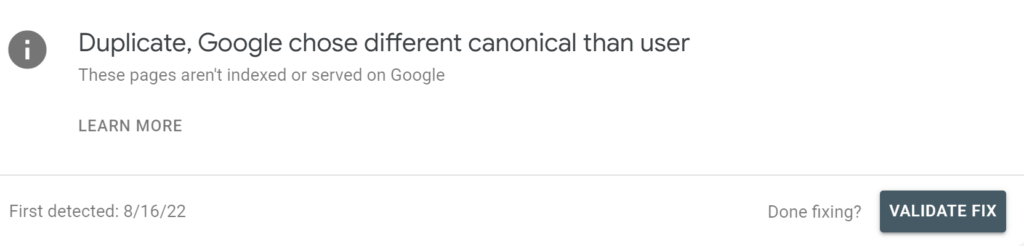
Validate GSC Issues
Optimizing Your Store’s Content
In 2026, Entity Clarity is king. You need to tell search engines exactly what you sell.
As we move toward a future dominated by automated systems, your content must be prepared for more than just a standard search bar. We are entering an era where the future isn’t search—it’s agentic, and GSC is your first line of defense in ensuring these agents can find you.
Best Practices For Content Optimization
To make your Shopify store stand out, focus on creating high-quality content. Here are some tips:
- Research keywords: Find out what words people use to search for products like yours.
- Write clear descriptions: Make sure your product descriptions are easy to understand and informative.
- Use headings and bullet points: Break up text to make it easier to read.
Optimizing Your Structured Data
Shopify provides built-in structured data implementation, offering a solid foundation for SEO. However, you can further improve your site’s SEO performance by adding additional structured data types, such as:
- Breadcrumbs
- FAQ Page
- Local Business
- Article Pages
- Shipping and Delivery
- Merchant Return Policy
You can achieve this by using schema apps or schema data generators and custom coding in your theme’s Liquid templates with the help of a Shopify developer. Using an app is often a better long-term solution as it ensures you stay up to date with schema updates and eliminates the need for manual code changes.
By incorporating different types of schema, your webpage can benefit from enhanced visibility in search engine results pages (SERPs), thanks to rich snippets.
Linking Google Search Console With Google Analytics 4 (GA4)
Linking these tools provides a 360-degree view. You can see not just who clicked, but what they did after arriving.
- Benefits: Identify which keywords lead to the highest Conversion Rate (CR) and Average Order Value (AOV).
- Setting it up: In GA4, go to Admin > Product Links > Search Console Links.
Setting Up The Link
To connect Google Search Console with Google Analytics, follow these steps:
- Go to Google Analytics and click on the Admin section.
- Under Property, select Data Streams and choose your website.
- Scroll down to Search Console linking and click on Link.
- Select the correct property from your Google Search Console account and click Confirm.
Analyzing Combined Data Insights
Once linked, you can access a wealth of data. Here’s what to look for:
- Traffic Sources: Understand where your visitors are coming from.
- User Behavior: Analyze how users navigate your site after arriving from search results.
- Conversion Rates: Measure how well your organic traffic converts into sales.
By linking these two powerful tools, you can gain valuable insights that help improve your Shopify store’s visibility and performance in search results. Regularly review this data to make informed decisions that drive growth.
Final Thoughts on Using Google Search Console for Your Shopify Store
In conclusion, using Google Search Console with your Shopify store is an ongoing journey, not just a one-time task. By consistently checking your store’s performance and making changes based on the insights you gather, you can significantly boost your visibility on Google. This means more visitors to your site, which can lead to increased sales and profits. Remember to keep your sitemap updated and monitor your backlinks, as these are key to improving your SEO. Pairing Google Search Console with Google Analytics can give you even deeper insights into how your store is doing. While SEO might seem tricky at times, the benefits are worth the effort. And if you ever feel lost, don’t hesitate to reach out for help from experts who understand Shopify and SEO.
Frequently Asked Questions
1. How do I know if my Shopify store is ready for AI Search Overviews?
Check your GSC “Search Appearance” report. If you see your brand appearing in “Knowledge Graph” or “Rich Snippets,” you are on the right track. Ensuring your content answers “What, How, and Why” questions clearly is key for AI citation.
2. My GSC shows "Crawl Budget" issues. What does this mean?
For large Shopify stores, Google might stop crawling before reaching all pages. This is often caused by infinite scroll issues or too many filter pages. Our Shopify Managed Services team optimizes robots.txt to focus Google’s energy on high-margin products.
3. How often should I check Google Search Console?
Weekly for performance tracking, but we recommend daily alerts for “Indexing Errors.” A sudden drop in indexed pages can mean a technical glitch that needs immediate dev intervention.
4. Can I use GSC to find ideas for Klaviyo email campaigns?
Yes! Look at the “Queries” report to see what problems your customers are trying to solve. Use those exact phrases in your subject lines to increase open rates and relevance.
5. Is it better to use an app for SEO or a Senior Team?
Apps are great for automation, but they can’t tell you why your strategy isn’t working. A Senior SEO Strategist uses GSC to spot patterns that apps miss, such as cannibalization between two similar product categories.
Trackbacks/Pingbacks